> ## Documentation Index
> Fetch the complete documentation index at: https://learn.art-opia.com/llms.txt
> Use this file to discover all available pages before exploring further.
# Value & Insights
> Log acquisitions, valuations, insurance figures and sale prices for each artwork, and open the Insights panel for a live summary of purchase value, top works, documents and acquisitions.
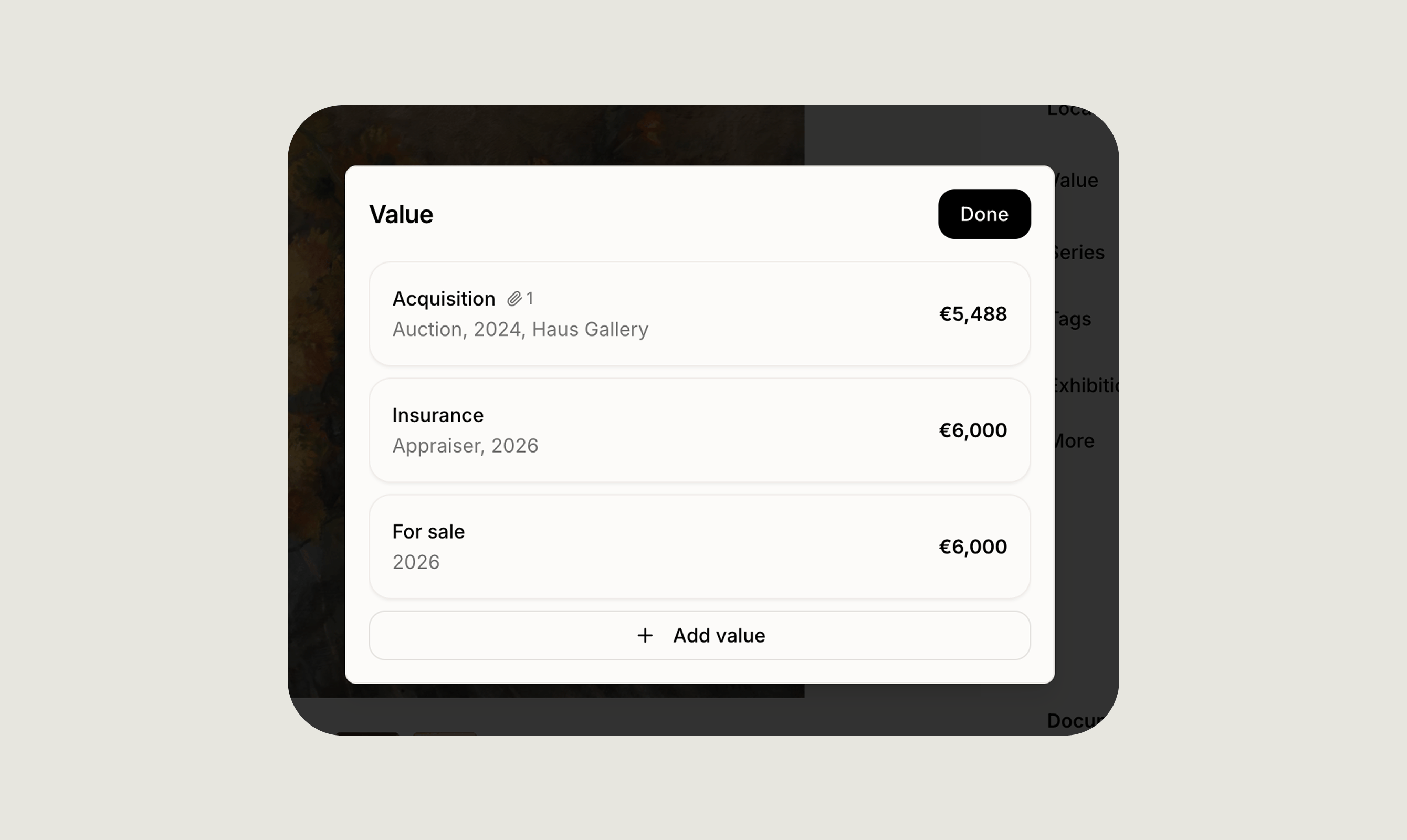 Artopia tracks value at two levels. Each artwork has its own **Value** section, where you record what you paid, what it has been valued at and what it has sold for. Insights then rolls that data up into a live summary across the collection.
## Recording value
Open any artwork, go to the **Value** section and click **Add value** to choose what kind of entry you are recording:
* **Acquisition**, what you paid for the work
* **Valuation**, an appraisal or your own estimate
* **Insurance**, the insured replacement value
* **Sale price**, what the work is currently offered at, or what it sold for
Every entry is dated, so you can add as many as you need over time and keep the full picture of what a work has been worth.
## What each entry records
Every entry records a currency, an amount and a year, with Add date if you want an exact date rather than a year alone. All four can have documents linked from the files already uploaded to the artwork, such as an invoice, an appraisal report or an insurance schedule.
What changes between them:
* **Acquisition** is what you paid in total, including any buyer's premium or fees. Record where the work came from, choosing between artist, gallery, art fair, auction, estate or other, and add a note with any further detail.
* **Valuation** is what the work is judged to be worth, whether by a professional or by you. Record the source, choosing between gallery, auction, appraiser, self or other, and add a note.
* **Insurance** is the replacement value the work is covered for. Same fields as a valuation.
* **Sale price** asks whether the figure is an asking price or what the work sold for. Choosing Sold for opens two further fields: the channel it sold through, either gallery, auction, art fair or other, and the buyer's name or organisation.
## Insights
Insights summarises the artworks currently visible in your list. Because it reads your current view, filtering or searching first will scope the numbers to that selection.
Artopia tracks value at two levels. Each artwork has its own **Value** section, where you record what you paid, what it has been valued at and what it has sold for. Insights then rolls that data up into a live summary across the collection.
## Recording value
Open any artwork, go to the **Value** section and click **Add value** to choose what kind of entry you are recording:
* **Acquisition**, what you paid for the work
* **Valuation**, an appraisal or your own estimate
* **Insurance**, the insured replacement value
* **Sale price**, what the work is currently offered at, or what it sold for
Every entry is dated, so you can add as many as you need over time and keep the full picture of what a work has been worth.
## What each entry records
Every entry records a currency, an amount and a year, with Add date if you want an exact date rather than a year alone. All four can have documents linked from the files already uploaded to the artwork, such as an invoice, an appraisal report or an insurance schedule.
What changes between them:
* **Acquisition** is what you paid in total, including any buyer's premium or fees. Record where the work came from, choosing between artist, gallery, art fair, auction, estate or other, and add a note with any further detail.
* **Valuation** is what the work is judged to be worth, whether by a professional or by you. Record the source, choosing between gallery, auction, appraiser, self or other, and add a note.
* **Insurance** is the replacement value the work is covered for. Same fields as a valuation.
* **Sale price** asks whether the figure is an asking price or what the work sold for. Choosing Sold for opens two further fields: the channel it sold through, either gallery, auction, art fair or other, and the buyer's name or organisation.
## Insights
Insights summarises the artworks currently visible in your list. Because it reads your current view, filtering or searching first will scope the numbers to that selection.
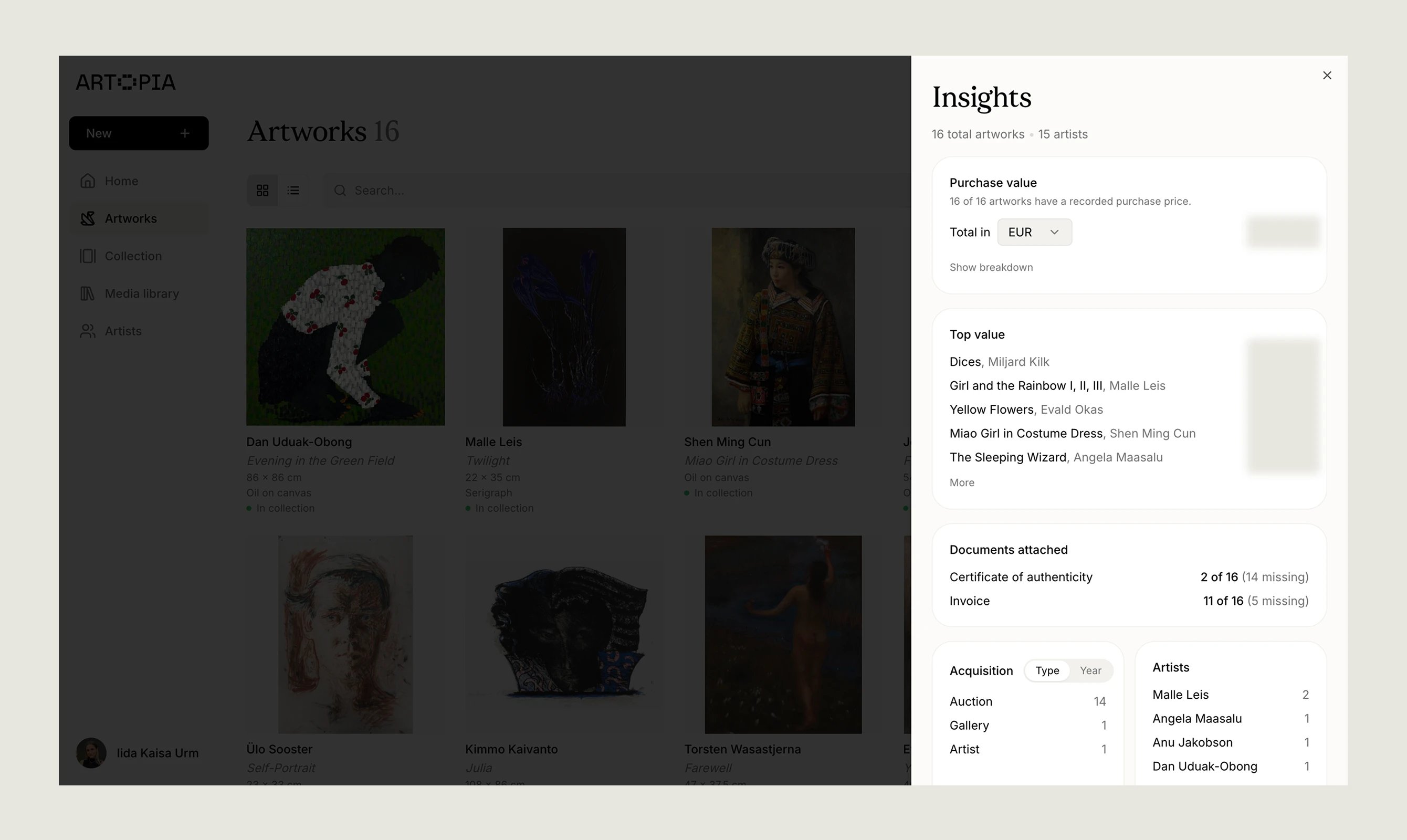 Filter by artist, status or year before opening Insights to get a focused summary of one part of your collection.
### Opening Insights
From the **Artworks** list, click the **Insights** button in the top bar on desktop, or in the header on mobile. It opens as a panel over the list, so you do not lose your place.
### What's inside
How many of the visible artworks have a purchase price recorded, and the total across them. Choose which currency to see the total in and Artopia converts using live exchange rates.
Your five highest works by purchase price, each with its artist and price, expandable to ten.
How many artworks have a certificate of authenticity and how many have an invoice, with the number missing alongside.
Your acquisitions grouped by source or by year, with a count for each, expandable to ten. Works with no source recorded are grouped together.
Your most represented artists by number of works in the current view.
If none of the visible artworks have a purchase price recorded, Insights tells you so. If exchange rates cannot be loaded, it says so and still shows the totals in their original currencies.
## How Value and Insights connect
Insights is built on acquisition data: what you paid, in what currency, when and from whom. Valuation, insurance and sale price entries do not feed into it.
So adding an appraisal or an insurance figure will not change the numbers in Insights. Value is your detailed history for a single work. Insights is a quick view across the collection, based on what you paid.
## Related topics
- [Track values](/learn/track-values.md)
- [April 2026](/updates/april-2026.md)
- [Welcome to Artopia](/learn/welcome-to-artopia.md)
Filter by artist, status or year before opening Insights to get a focused summary of one part of your collection.
### Opening Insights
From the **Artworks** list, click the **Insights** button in the top bar on desktop, or in the header on mobile. It opens as a panel over the list, so you do not lose your place.
### What's inside
How many of the visible artworks have a purchase price recorded, and the total across them. Choose which currency to see the total in and Artopia converts using live exchange rates.
Your five highest works by purchase price, each with its artist and price, expandable to ten.
How many artworks have a certificate of authenticity and how many have an invoice, with the number missing alongside.
Your acquisitions grouped by source or by year, with a count for each, expandable to ten. Works with no source recorded are grouped together.
Your most represented artists by number of works in the current view.
If none of the visible artworks have a purchase price recorded, Insights tells you so. If exchange rates cannot be loaded, it says so and still shows the totals in their original currencies.
## How Value and Insights connect
Insights is built on acquisition data: what you paid, in what currency, when and from whom. Valuation, insurance and sale price entries do not feed into it.
So adding an appraisal or an insurance figure will not change the numbers in Insights. Value is your detailed history for a single work. Insights is a quick view across the collection, based on what you paid.
## Related topics
- [Track values](/learn/track-values.md)
- [April 2026](/updates/april-2026.md)
- [Welcome to Artopia](/learn/welcome-to-artopia.md)