> ## Documentation Index
> Fetch the complete documentation index at: https://learn.art-opia.com/llms.txt
> Use this file to discover all available pages before exploring further.
# Inventory numbering
> Give each artwork a custom inventory number in Artopia, like PTG-007 or 2026-001, with reusable prefixes, auto-suggested next numbers, sorting and filtering.
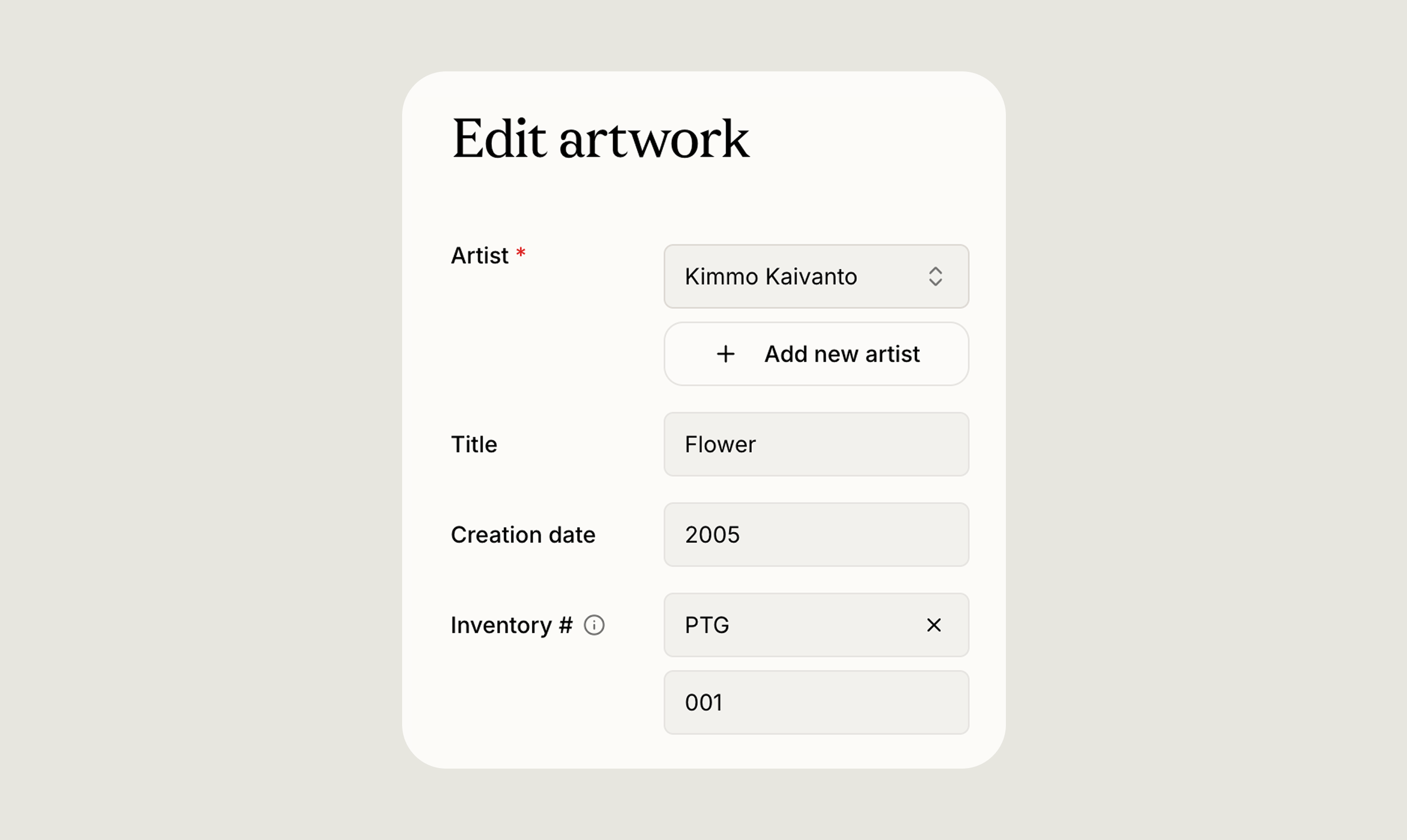 Inventory numbering is an optional way to tag each artwork with your own reference ID, the kind of code a gallery, studio or private collection uses on labels, invoices and shipping paperwork (e.g. `PTG-007`, `SCULP-014`, `2026-001`).
Every inventory number has two parts, and both are optional:
* **Prefix**, a short label you define, such as `PTG`, `DRW`, or `2026`
* **Number**, digits only, padded to at least three digits when displayed, so`7` shows as `007` and `1500` stays `1500`
You can leave both blank, use a number on its own, or use both together. The displayed result is either`PTG-007`or just `007`. A prefix without a number isn't shown anywhere.
## Adding a number to an artwork
On the artwork create or edit form, look for the **Inventory #** section (with a small info tooltip). It has two side-by-side inputs:
* A **Prefix** dropdown
* A **Number** input
Once set, the number appears under the artist and title on artwork cards and rows, in the metadata on the artwork page, and as both a sort option and a filter in the Artworks list.
## Working with prefixes
Click the **Prefix** field to see every prefix you have used in the current collection, listed alphabetically. To **create a new one**, start typing. If the name does not match anything you have used before, an option to create it appears at the bottom of the list. Selecting it saves the prefix and applies it to the artwork you are editing.
Matching ignores capitalisation, so typing `drawing` when `Drawing` already exists reuses the existing prefix rather than creating a near-duplicate.
Each prefix has a menu with Rename and Delete:
* **Renaming** updates the prefix on every artwork that uses it. You cannot rename a prefix to a name already in use.
* **Deleting** removes the prefix from any artworks that use it and takes it out of your suggestions. The numbers themselves are kept, only the prefix label goes.
To clear the prefix on a single artwork without deleting it everywhere, click the **X** inside the Prefix field.
Prefixes belong to the collection they were created in, so switching collections shows a different list.
## The number field
The **Number** field accepts digits only. Anything else you type is ignored. When you leave the field, the value is padded to at least three digits (`7` → `007`, `12` → `012`, `1500` → `1500`).
Whenever you change the prefix, Artopia suggests the next available number for it: the highest number currently in use for that prefix, plus one. If the prefix is new, it starts at`001` .
Changing the prefix on an artwork that already has a number replaces that number with a new suggestion, and clearing the prefix clears the number too. The suggestion is only a starting point, so you can always type your own.
If you enter a number another artwork in the same collection already uses, a small note appears under the field:
> "This inventory number is already in use."
It is a reminder rather than a block. Artopia does not enforce unique numbers, and you can save either way.
## Finding artworks by inventory number
In the Artworks list, **sort by** Inventory # to order works by prefix alphabetically, then by number. Artworks with no inventory number at all come last.
To filter, open **Filter by** and choose Inventory #. You can search your prefixes, select several at once, and use the No prefix option to find works without one. Active filters appear as chips at the top of the list. Filtering by a specific number or range is not supported, only by prefix.
## Transfers
When you [transfer](/features/sharing) an artwork to another Artopia user, their copy arrives with no prefix and no number, so they can apply their own scheme. Choosing a prefix in their collection triggers the usual suggestion. Your own artwork keeps its inventory number.
## Tips
* **Year-based prefixes** (`2026-`, `2027-`) show at a glance when a work entered the collection.
* **Medium-based prefixes** (`PTG-` for paintings, `DRW-` for drawings, `SCULP-` for sculpture) group similar works together when sorting.
* **Padding keeps the sort order clean**. `PTG-002` comes before `PTG-010`, which wouldn't happen with `2` and `10`.
* There is no dedicated "Inventory settings" page. Creating, renaming, and deleting prefixes all happen inline from the **Prefix** dropdown on any artwork form.
## Related topics
- [Artworks](/features/artworks.md)
- [Export your data from Artopia](/features/exporting-data.md)
- [Artwork records](/learn/artwork-records.md)
Inventory numbering is an optional way to tag each artwork with your own reference ID, the kind of code a gallery, studio or private collection uses on labels, invoices and shipping paperwork (e.g. `PTG-007`, `SCULP-014`, `2026-001`).
Every inventory number has two parts, and both are optional:
* **Prefix**, a short label you define, such as `PTG`, `DRW`, or `2026`
* **Number**, digits only, padded to at least three digits when displayed, so`7` shows as `007` and `1500` stays `1500`
You can leave both blank, use a number on its own, or use both together. The displayed result is either`PTG-007`or just `007`. A prefix without a number isn't shown anywhere.
## Adding a number to an artwork
On the artwork create or edit form, look for the **Inventory #** section (with a small info tooltip). It has two side-by-side inputs:
* A **Prefix** dropdown
* A **Number** input
Once set, the number appears under the artist and title on artwork cards and rows, in the metadata on the artwork page, and as both a sort option and a filter in the Artworks list.
## Working with prefixes
Click the **Prefix** field to see every prefix you have used in the current collection, listed alphabetically. To **create a new one**, start typing. If the name does not match anything you have used before, an option to create it appears at the bottom of the list. Selecting it saves the prefix and applies it to the artwork you are editing.
Matching ignores capitalisation, so typing `drawing` when `Drawing` already exists reuses the existing prefix rather than creating a near-duplicate.
Each prefix has a menu with Rename and Delete:
* **Renaming** updates the prefix on every artwork that uses it. You cannot rename a prefix to a name already in use.
* **Deleting** removes the prefix from any artworks that use it and takes it out of your suggestions. The numbers themselves are kept, only the prefix label goes.
To clear the prefix on a single artwork without deleting it everywhere, click the **X** inside the Prefix field.
Prefixes belong to the collection they were created in, so switching collections shows a different list.
## The number field
The **Number** field accepts digits only. Anything else you type is ignored. When you leave the field, the value is padded to at least three digits (`7` → `007`, `12` → `012`, `1500` → `1500`).
Whenever you change the prefix, Artopia suggests the next available number for it: the highest number currently in use for that prefix, plus one. If the prefix is new, it starts at`001` .
Changing the prefix on an artwork that already has a number replaces that number with a new suggestion, and clearing the prefix clears the number too. The suggestion is only a starting point, so you can always type your own.
If you enter a number another artwork in the same collection already uses, a small note appears under the field:
> "This inventory number is already in use."
It is a reminder rather than a block. Artopia does not enforce unique numbers, and you can save either way.
## Finding artworks by inventory number
In the Artworks list, **sort by** Inventory # to order works by prefix alphabetically, then by number. Artworks with no inventory number at all come last.
To filter, open **Filter by** and choose Inventory #. You can search your prefixes, select several at once, and use the No prefix option to find works without one. Active filters appear as chips at the top of the list. Filtering by a specific number or range is not supported, only by prefix.
## Transfers
When you [transfer](/features/sharing) an artwork to another Artopia user, their copy arrives with no prefix and no number, so they can apply their own scheme. Choosing a prefix in their collection triggers the usual suggestion. Your own artwork keeps its inventory number.
## Tips
* **Year-based prefixes** (`2026-`, `2027-`) show at a glance when a work entered the collection.
* **Medium-based prefixes** (`PTG-` for paintings, `DRW-` for drawings, `SCULP-` for sculpture) group similar works together when sorting.
* **Padding keeps the sort order clean**. `PTG-002` comes before `PTG-010`, which wouldn't happen with `2` and `10`.
* There is no dedicated "Inventory settings" page. Creating, renaming, and deleting prefixes all happen inline from the **Prefix** dropdown on any artwork form.
## Related topics
- [Artworks](/features/artworks.md)
- [Export your data from Artopia](/features/exporting-data.md)
- [Artwork records](/learn/artwork-records.md)