> ## Documentation Index
> Fetch the complete documentation index at: https://learn.art-opia.com/llms.txt
> Use this file to discover all available pages before exploring further.
# Track values
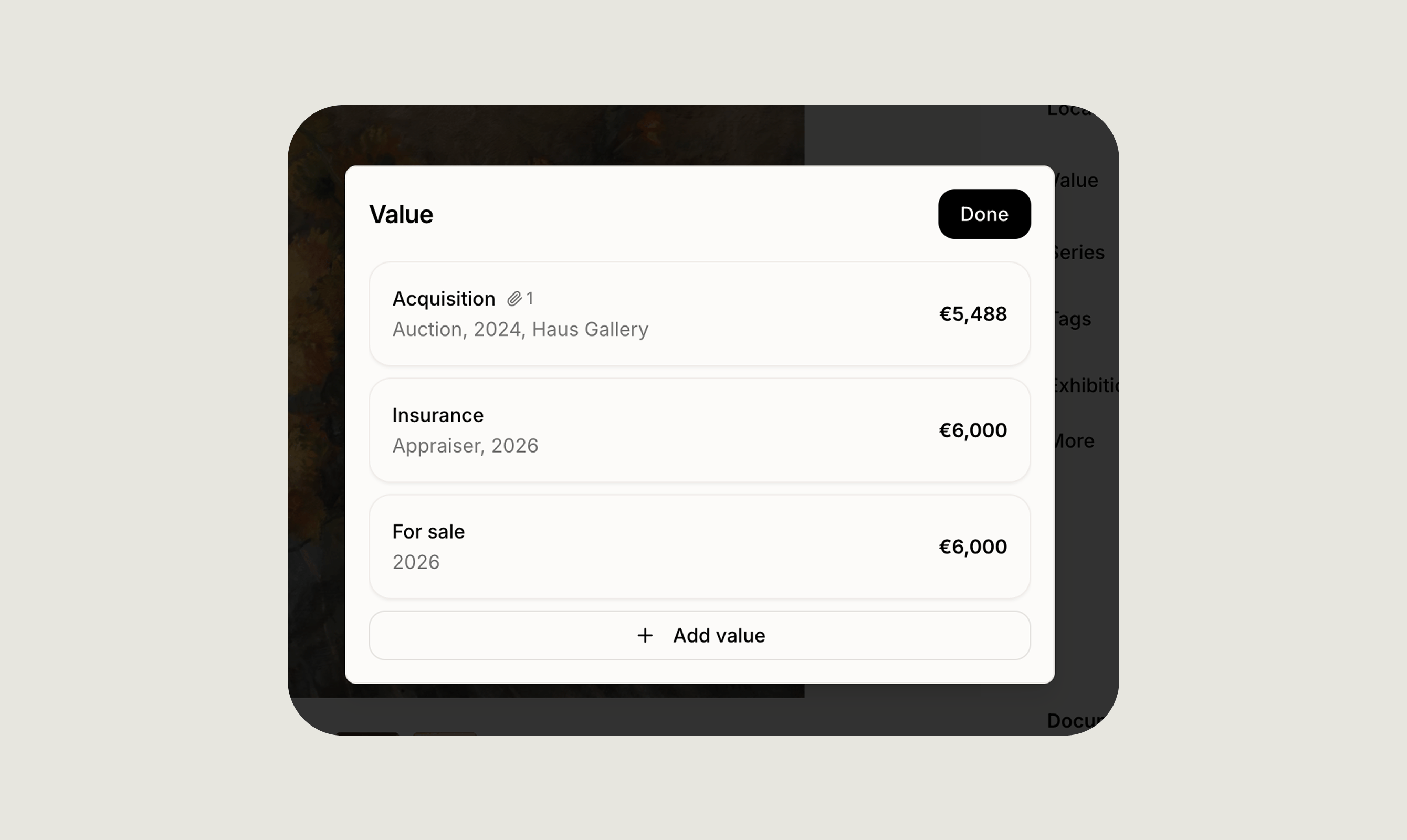
> Every artwork in Artopia has its own value history. Asingle, chronological log of how you got the work, what it's been valued at over time, and, if it moves on, how it was sold.
Value history is the financial backbone of your collection. It feeds directly into insurance PDFs, portfolio reporting, and any export where you need a clean summary of a work's monetary story.
 ## The entry types
Value history is one log with three kinds of entries. Add as many as you need over the life of a work.
### Acquisition
How the work came into your collection.
* **Type**: Purchase, gift, inheritance, commission, or trade.
* **Date**: When you acquired it.
* **Source**: The gallery, artist, auction house, or individual you got it from.
* **Price**: What you paid, if applicable.
* **Documents**: Attach the invoice, receipt, or transfer paperwork.
### Valuation
A point-in-time estimate of the work's worth.
* **Valuation type**: Market value, insurance replacement value, or personal estimate.
* **Date**: When the valuation was made.
* **Amount** and **currency**.
* **Source**: Who provided the valuation, a third-party appraiser, gallery, insurer, or yourself.
* **Documents**: Attach the appraisal report or supporting paperwork.
Add valuations at any cadence, annually, before an insurance renewal, or whenever the market shifts.
### Sale
If the work leaves your collection.
* **Date** of sale.
* **Price** and **currency**.
* **Buyer**: The individual, gallery, or auction house it went to.
* **Documents**: Attach the sales invoice or contract.
## How the log works
* You can **edit or delete** any entry at any time.
* Each entry can carry its own **notes** and **linked documents** for full context.
* The most recent valuation is used as the work's **current value** across dashboards and exports.
Keep at least one acquisition entry on every work. Even if the price is unknown, recording the date and source anchors the rest of the history.
## Where value history appears
* On the artwork detail page as a chronological log.
* In **insurance PDFs**, a clean summary of acquisitions, valuations, and totals.
* In **portfolio value reporting** across your whole collection.
* In **exports** and **transfers**, if you choose to include it.
## Privacy
Value history is **private by default**. It only leaves the record when you explicitly include it in an export, PDF, or transfer, never on public collection pages unless you turn that on.
## Related pages
See every field available on an artwork record, including value history, provenance, and status.
Track total value, acquisitions, and documents across your entire collection at a glance.
If you have any questions, reach out at [hello@art-opia.com](mailto:hello@art-opia.com)
## Related topics
- [Value & Insights](/artworks/value-insights.md)
- [Track provenance](/learn/track-provenance.md)
- [Add artwork](/learn/add-artwork.md)
## The entry types
Value history is one log with three kinds of entries. Add as many as you need over the life of a work.
### Acquisition
How the work came into your collection.
* **Type**: Purchase, gift, inheritance, commission, or trade.
* **Date**: When you acquired it.
* **Source**: The gallery, artist, auction house, or individual you got it from.
* **Price**: What you paid, if applicable.
* **Documents**: Attach the invoice, receipt, or transfer paperwork.
### Valuation
A point-in-time estimate of the work's worth.
* **Valuation type**: Market value, insurance replacement value, or personal estimate.
* **Date**: When the valuation was made.
* **Amount** and **currency**.
* **Source**: Who provided the valuation, a third-party appraiser, gallery, insurer, or yourself.
* **Documents**: Attach the appraisal report or supporting paperwork.
Add valuations at any cadence, annually, before an insurance renewal, or whenever the market shifts.
### Sale
If the work leaves your collection.
* **Date** of sale.
* **Price** and **currency**.
* **Buyer**: The individual, gallery, or auction house it went to.
* **Documents**: Attach the sales invoice or contract.
## How the log works
* You can **edit or delete** any entry at any time.
* Each entry can carry its own **notes** and **linked documents** for full context.
* The most recent valuation is used as the work's **current value** across dashboards and exports.
Keep at least one acquisition entry on every work. Even if the price is unknown, recording the date and source anchors the rest of the history.
## Where value history appears
* On the artwork detail page as a chronological log.
* In **insurance PDFs**, a clean summary of acquisitions, valuations, and totals.
* In **portfolio value reporting** across your whole collection.
* In **exports** and **transfers**, if you choose to include it.
## Privacy
Value history is **private by default**. It only leaves the record when you explicitly include it in an export, PDF, or transfer, never on public collection pages unless you turn that on.
## Related pages
See every field available on an artwork record, including value history, provenance, and status.
Track total value, acquisitions, and documents across your entire collection at a glance.
If you have any questions, reach out at [hello@art-opia.com](mailto:hello@art-opia.com)
## Related topics
- [Value & Insights](/artworks/value-insights.md)
- [Track provenance](/learn/track-provenance.md)
- [Add artwork](/learn/add-artwork.md)