> ## Documentation Index
> Fetch the complete documentation index at: https://learn.art-opia.com/llms.txt
> Use this file to discover all available pages before exploring further.
# August 2026
August brought four major additions to Artopia: a new way to group and present artworks, read-only sharing for collections, support for video artworks, and a more detailed way to record how a work was acquired. Here is what is new.
 ## **Artwork groups and private viewing rooms**
You can now bring a selection of artworks together into a group for a specific purpose, an upcoming exhibition, a proposed sale, a client presentation, or a viewing appointment. Add works from your collection, arrange them in the order you want, and update the selection whenever it changes.
## **Artwork groups and private viewing rooms**
You can now bring a selection of artworks together into a group for a specific purpose, an upcoming exhibition, a proposed sale, a client presentation, or a viewing appointment. Add works from your collection, arrange them in the order you want, and update the selection whenever it changes.
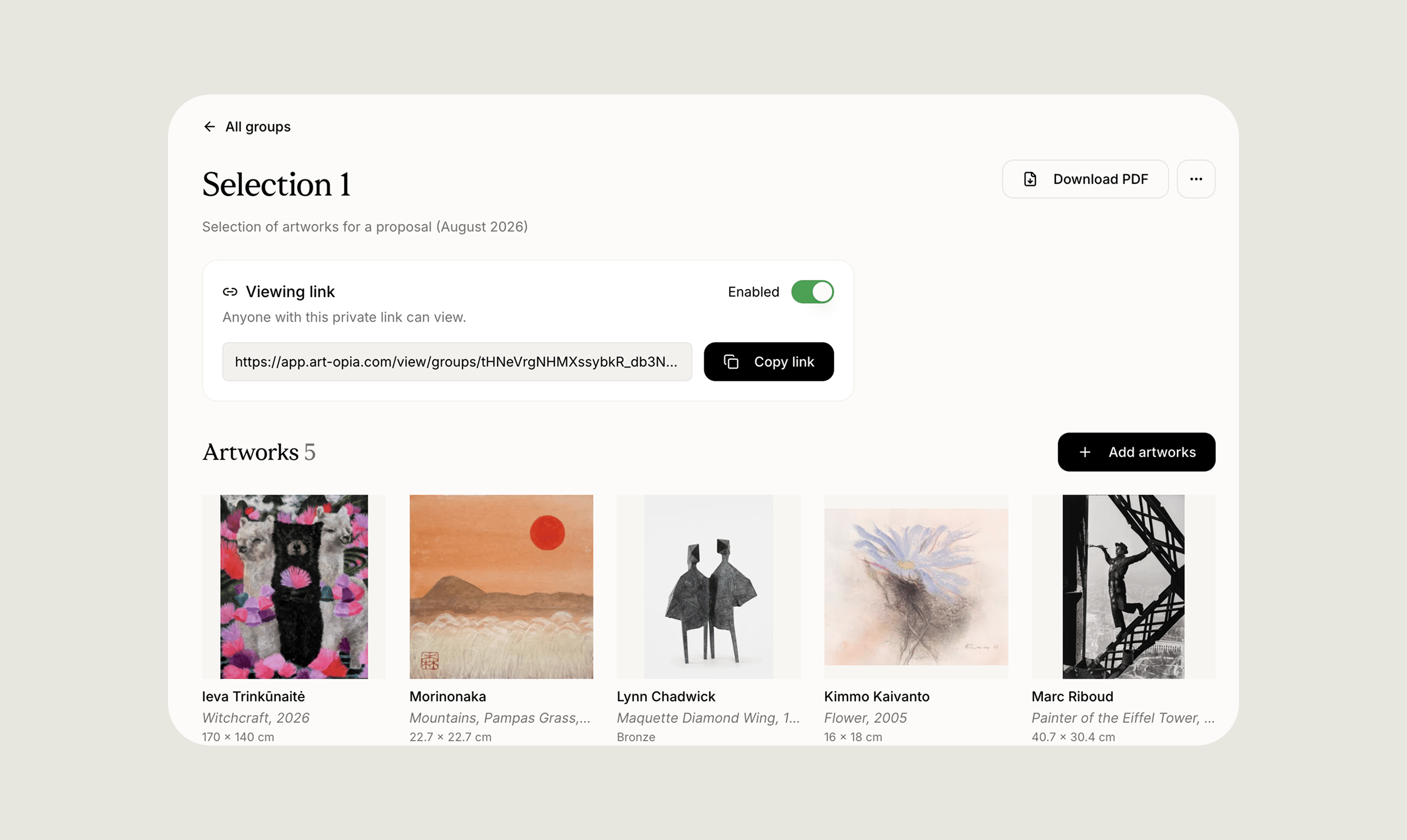 Each group can also be presented as a private viewing room. This gives whoever you share it with a focused, full-page view of exactly the works in that group, without exposing the rest of your collection. It works well for sharing a selection with a client, presenting at an art fair, preparing a proposal, or giving a curator or advisor a clear view of specific works.
Groups can also be exported as a CSV or a PDF, useful for a proposal or an offer sheet you want to send outside Artopia.
## **Read-only collection sharing**
You can now invite someone to view a collection without giving them the ability to make changes to it. An invited viewer can browse the artworks, open individual records, and move between list, grid, and detail views, but they cannot create, edit, delete, reorder, or change the status of anything.
Each group can also be presented as a private viewing room. This gives whoever you share it with a focused, full-page view of exactly the works in that group, without exposing the rest of your collection. It works well for sharing a selection with a client, presenting at an art fair, preparing a proposal, or giving a curator or advisor a clear view of specific works.
Groups can also be exported as a CSV or a PDF, useful for a proposal or an offer sheet you want to send outside Artopia.
## **Read-only collection sharing**
You can now invite someone to view a collection without giving them the ability to make changes to it. An invited viewer can browse the artworks, open individual records, and move between list, grid, and detail views, but they cannot create, edit, delete, reorder, or change the status of anything.
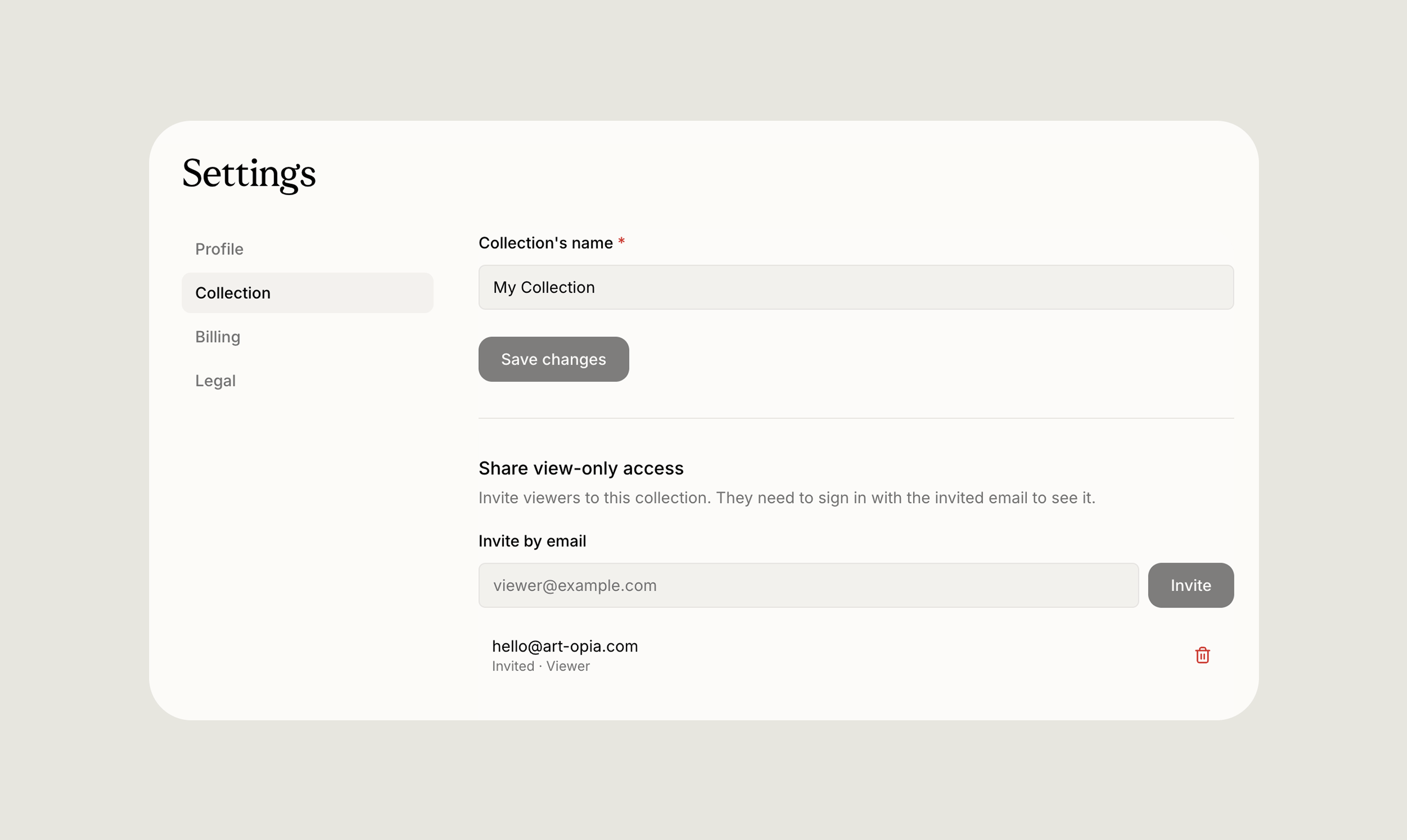 This is useful whenever you want someone to see what is in a collection without opening it up for editing: sharing information with a client, giving an advisor or consultant a way to review artworks, working with a team member, or letting an [institution or foundation](https://art-opia.com/articles/art-inventory-management-for-foundations-why-it-matters-and-where-to-start) look through a collection ahead of a loan. It sits alongside your[ public collection](https://learn.art-opia.com/features/public-collection) as another way to share your work, this one aimed at a specific person rather than the public.
Access is managed from the collection settings, where you can invite viewers, see who currently has access, and revoke it at any point. Anyone viewing in this mode sees a clear indicator that they are in view-only mode, so there is never any ambiguity about what they can and cannot do.
## **Video artwork support**
Artworks can now include video alongside images and documents. Artopia supports the common formats you are likely to already have, including MP4, MOV, M4V, WebM, OGV, and OGG.
A video can be attached to an artwork wherever the rest of its media lives, and it appears throughout the collection: on the artwork's detail page, in the [Media library](https://learn.art-opia.com/features/media-library), in artwork groups and viewing rooms, on your public collection, and anywhere else you browse or select artworks. When scanning through a grid or a group, a video shows as a still poster image so browsing stays quick and visual. Opening the artwork's detail page brings up the full video player.
This makes it possible to document moving image work, installations, performance pieces, and other time-based media in the same place as everything else in your collection, rather than keeping it separately.
## **A clearer acquisition cost breakdown**
Recording how a work was acquired is now more complete. Instead of a single purchase amount, you can break an acquisition down into its actual components: a base price, any percentage-based or fixed fees, and the calculated total cost.
This is useful whenever you want someone to see what is in a collection without opening it up for editing: sharing information with a client, giving an advisor or consultant a way to review artworks, working with a team member, or letting an [institution or foundation](https://art-opia.com/articles/art-inventory-management-for-foundations-why-it-matters-and-where-to-start) look through a collection ahead of a loan. It sits alongside your[ public collection](https://learn.art-opia.com/features/public-collection) as another way to share your work, this one aimed at a specific person rather than the public.
Access is managed from the collection settings, where you can invite viewers, see who currently has access, and revoke it at any point. Anyone viewing in this mode sees a clear indicator that they are in view-only mode, so there is never any ambiguity about what they can and cannot do.
## **Video artwork support**
Artworks can now include video alongside images and documents. Artopia supports the common formats you are likely to already have, including MP4, MOV, M4V, WebM, OGV, and OGG.
A video can be attached to an artwork wherever the rest of its media lives, and it appears throughout the collection: on the artwork's detail page, in the [Media library](https://learn.art-opia.com/features/media-library), in artwork groups and viewing rooms, on your public collection, and anywhere else you browse or select artworks. When scanning through a grid or a group, a video shows as a still poster image so browsing stays quick and visual. Opening the artwork's detail page brings up the full video player.
This makes it possible to document moving image work, installations, performance pieces, and other time-based media in the same place as everything else in your collection, rather than keeping it separately.
## **A clearer acquisition cost breakdown**
Recording how a work was acquired is now more complete. Instead of a single purchase amount, you can break an acquisition down into its actual components: a base price, any percentage-based or fixed fees, and the calculated total cost.
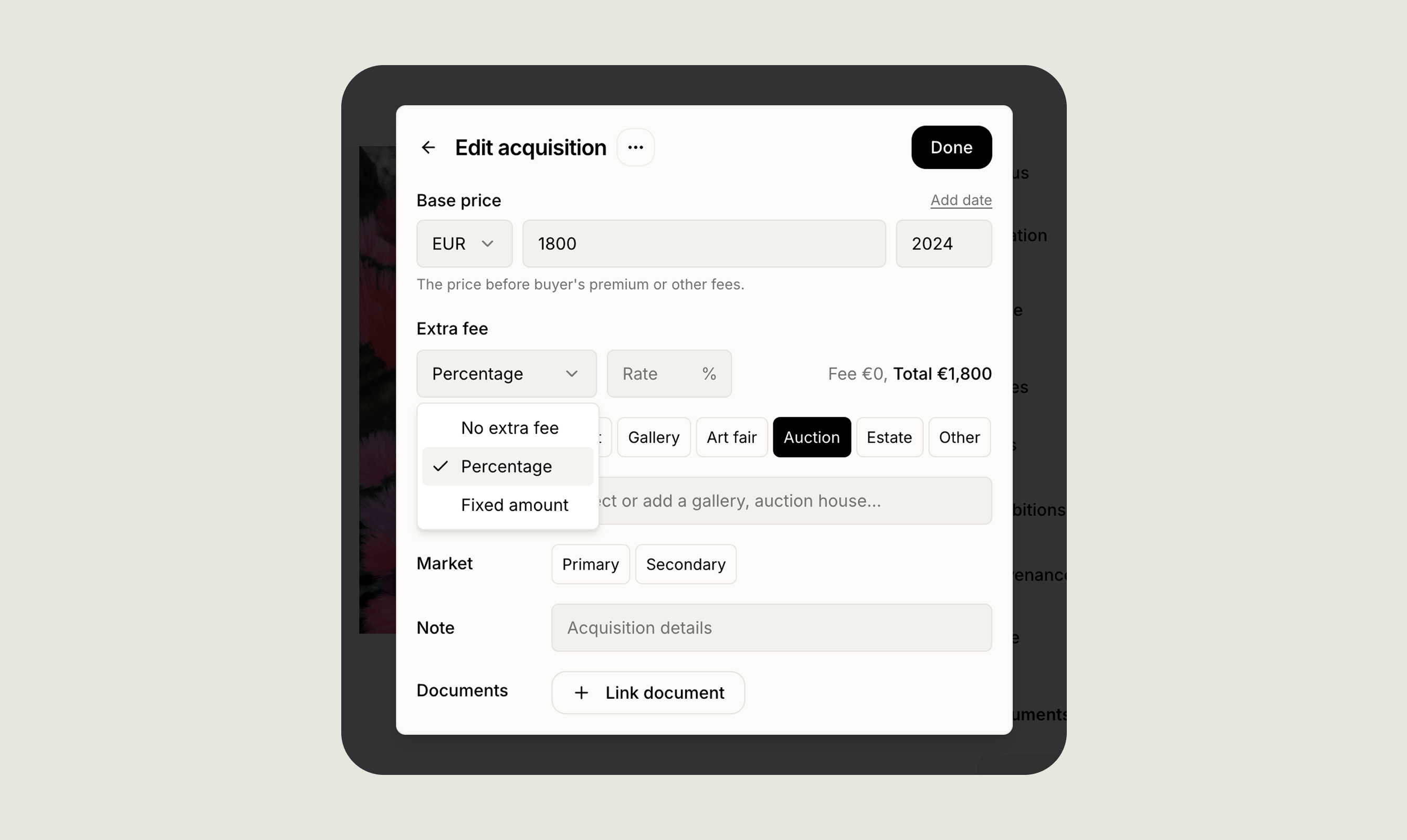 This detail now appears directly in each artwork's [value summary](https://learn.art-opia.com/learn/track-values), giving a clearer picture of the full cost behind a work at a glance. If you imported acquisition records previously, that information remains visible and now appears alongside everything else in the value view, so older records are easier to review without losing what was already there.
Alongside your [inventory numbers](https://art-opia.com/articles/how-to-use-inventory-numbers-for-art-collection-management), a clearer acquisition record is another way to keep the collection legible as it grows.
## **Frequently asked questions**
### **What is a private viewing room in Artopia?**
A private viewing room is a shareable, focused presentation of an artwork group. Anyone you send the link to sees only the works in that group, in a clean full-page layout, without access to the rest of your collection.
### **Can I let someone view my collection without letting them edit it?**
Yes. Read-only sharing lets you invite a viewer who can browse artworks and open their details, but cannot create, edit, delete, or reorder anything. You can revoke their access at any time from the collection settings.
### **Does Artopia support video artworks?**
Yes. You can upload video in common formats including MP4, MOV, and WebM, and attach it to an artwork alongside images and documents. Video appears throughout the collection with a poster image in grids, and the full player is available on the artwork's detail page.
## **What is next**
These updates round out how a collection can be organised, shared, and documented, from grouping works for a specific purpose to recording exactly what an acquisition cost. We will keep building in that direction. You can also read the [July product roundup](https://art-opia.com/articles/july-product-roundup) to see what shipped last month.
If you have feedback on any of these features, reach us at [hello@art-opia.com](mailto:hello@art-opia.com).
Artopia is art collection management software for private collectors. It helps you catalog artworks, manage artwork documentation, track provenance and acquisition records, and share your collection publicly, all in one place. [Start your art collection](https://app.art-opia.com/signup).
This detail now appears directly in each artwork's [value summary](https://learn.art-opia.com/learn/track-values), giving a clearer picture of the full cost behind a work at a glance. If you imported acquisition records previously, that information remains visible and now appears alongside everything else in the value view, so older records are easier to review without losing what was already there.
Alongside your [inventory numbers](https://art-opia.com/articles/how-to-use-inventory-numbers-for-art-collection-management), a clearer acquisition record is another way to keep the collection legible as it grows.
## **Frequently asked questions**
### **What is a private viewing room in Artopia?**
A private viewing room is a shareable, focused presentation of an artwork group. Anyone you send the link to sees only the works in that group, in a clean full-page layout, without access to the rest of your collection.
### **Can I let someone view my collection without letting them edit it?**
Yes. Read-only sharing lets you invite a viewer who can browse artworks and open their details, but cannot create, edit, delete, or reorder anything. You can revoke their access at any time from the collection settings.
### **Does Artopia support video artworks?**
Yes. You can upload video in common formats including MP4, MOV, and WebM, and attach it to an artwork alongside images and documents. Video appears throughout the collection with a poster image in grids, and the full player is available on the artwork's detail page.
## **What is next**
These updates round out how a collection can be organised, shared, and documented, from grouping works for a specific purpose to recording exactly what an acquisition cost. We will keep building in that direction. You can also read the [July product roundup](https://art-opia.com/articles/july-product-roundup) to see what shipped last month.
If you have feedback on any of these features, reach us at [hello@art-opia.com](mailto:hello@art-opia.com).
Artopia is art collection management software for private collectors. It helps you catalog artworks, manage artwork documentation, track provenance and acquisition records, and share your collection publicly, all in one place. [Start your art collection](https://app.art-opia.com/signup).