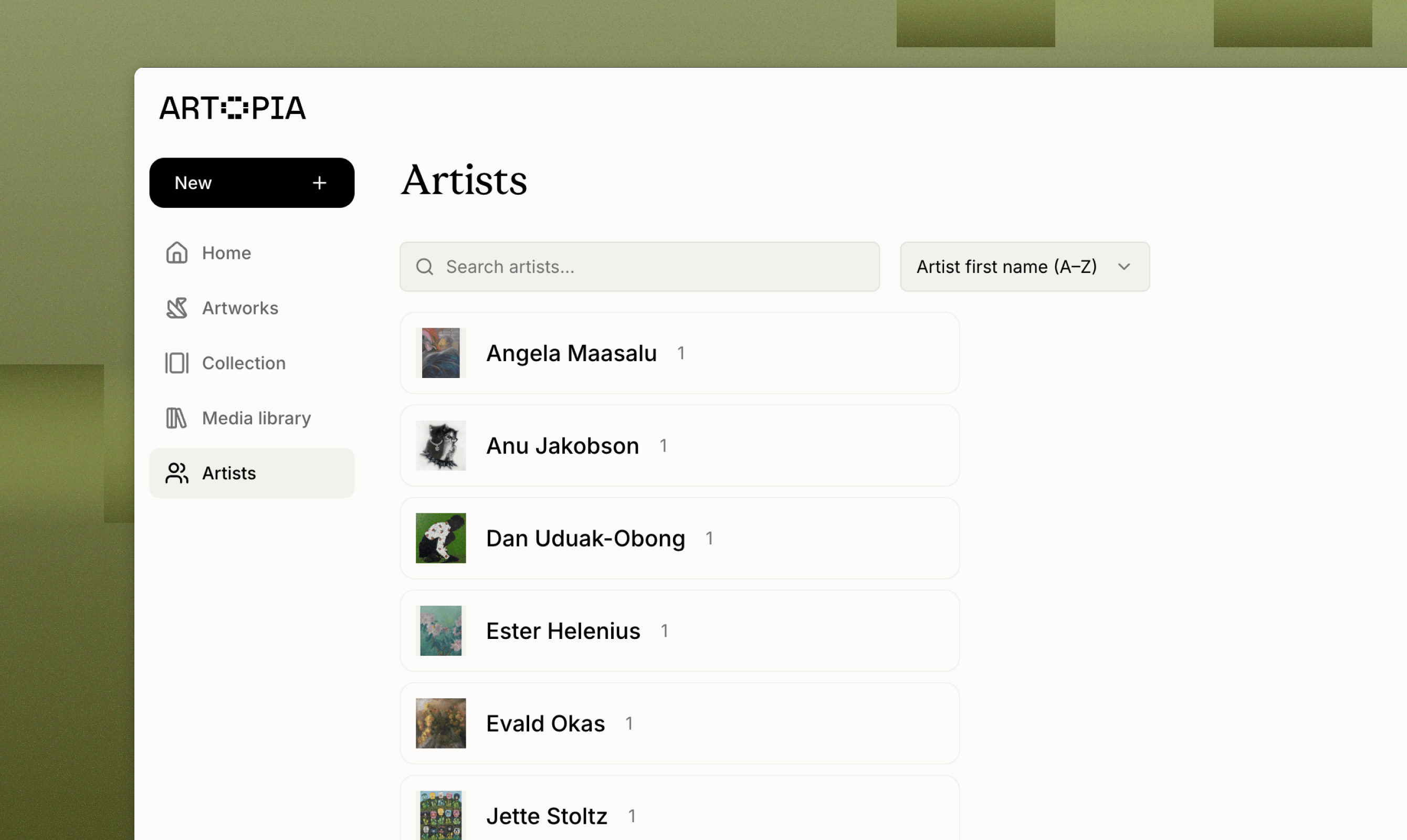
Manage a searchable directory of artists in your Artopia collection. Create each artist once, reuse them across artworks, and keep names, bios, and photos in sync.
Artists in Artopia are standalone records that live independently from any artwork. Create an artist once and reuse them across every work in your collection. Any update to the artist record is reflected everywhere they appear.
Create once, reuse everywhere. When adding an artwork, pick an existing artist from a searchable dropdown, or create a new one inline without leaving the artwork form.
Edits propagate automatically. Changing an artist’s name, biography, or photo updates every artwork linked to them.
Safe deletion. If you delete an artist, any linked artworks keep their record, the artist field is simply cleared, not the artwork itself.
Private by default. Artist records are private to your account. They appear on public collection pages only when you publish an artwork.
Artopia displays the Known as name whenever it’s set, and falls back to First name + Last name otherwise. This lets you store a legal name in the database while showing a professional name day-to-day.
Artists list: A searchable, sortable directory of every artist in your collection, showing an artwork thumbnail and count for each.
Artist detail page: Displays the profile photo, name, nationality, years, “based in” location, full biography, and a grid of every artwork by that artist.
Artwork form: A searchable combobox lets you select or create an artist while adding or editing an artwork.
{"docsConfig":{"theme":"mint","$schema":"https://mintlify.com/docs.json","name":"Artopia","description":"Artopia is the comprehensive art collection management and inventory platform designed for private collectors, art advisors, galleries, auction houses, and artists. Easily catalog your artworks with complete details, track artwork valuations over time, document provenance records, and securely attach supporting documents including certificates of authenticity and invoices. Whether managing a personal art collection or client portfolios, Artopia streamlines your art inventory management process. Share your collection publicly (optional) with collectors, institutions, and galleries, or keep it private. Key features include bulk artwork import, PDF export, and customizable public collection pages. From emerging collectors building their first collection to established collectors managing extensive inventories, Artopia is the all-in-one art collection management platform you need for complete art documentation and valuation tracking.","colors":{"primary":"#668324","light":"#ABCB62","dark":"#46571f"},"logo":{"light":"https://mintcdn.com/artopia/iD69qRxQlIIMQPDE/images/artopia-logo-black-medium.svg?fit=max\u0026auto=format\u0026n=iD69qRxQlIIMQPDE\u0026q=85\u0026s=b5cba413adee7d56dcd988c14b94b891","dark":"https://mintcdn.com/artopia/iD69qRxQlIIMQPDE/images/artopia-logo-black-medium.svg?fit=max\u0026auto=format\u0026n=iD69qRxQlIIMQPDE\u0026q=85\u0026s=b5cba413adee7d56dcd988c14b94b891","href":"https://art-opia.com/"},"favicon":{"light":"https://mintcdn.com/artopia/ByB_v1wrXQrh95Vh/images/artopia-icon-white-favicon.png?fit=max\u0026auto=format\u0026n=ByB_v1wrXQrh95Vh\u0026q=85\u0026s=5c5832cf6d18cb25c7a7298b48694d1b","dark":"https://mintcdn.com/artopia/ByB_v1wrXQrh95Vh/images/artopia-icon-white-favicon.png?fit=max\u0026auto=format\u0026n=ByB_v1wrXQrh95Vh\u0026q=85\u0026s=5c5832cf6d18cb25c7a7298b48694d1b"},"appearance":{"default":"light","strict":true},"background":{"color":{"light":"#F9F9F0","dark":"#1E1E1E"}},"navbar":{"links":[],"primary":{"type":"button","label":"Go to Artopia","href":"https://app.art-opia.com"}},"footer":{"socials":{"linkedin":"https://www.linkedin.com/company/art-opia","website":"https://art-opia.com/","instagram":"https://instagram.com/app.artopia"}},"seo":{"metatags":{"og:image":"https://framerusercontent.com/assets/cXP2PEnWynwP45Rj4k4mrc3Qa3M.png"}},"icons":{"library":"lucide"},"thumbnails":{"background":"https://mintcdn.com/artopia/1eaVaEkeGHvr4vOp/images/Websitecover.png?fit=max\u0026auto=format\u0026n=1eaVaEkeGHvr4vOp\u0026q=85\u0026s=5ba0f718e7d9a58a3e373b13ab6f78c3"},"styling":{"latex":false},"navigation":{"pages":[]}},"deployment":{"deploymentMetadataValue":{"subdomain":"artopia","hasAudioNarration":false,"actualSubdomain":"artopia","customDomains":["learn.art-opia.com"],"gitSource":{"type":"github","owner":"mintlify-community","repo":"docs-artopia-94f86543","deployBranch":"main","contentDirectory":"","isPrivate":true,"mountPath":"","label":""},"chroma":{"collectionId":"d25fdb28-db47-4eb8-98ea-d7bf733ed857","liveDeploymentHistoryId":"6abe2882a3cd31f3524a07dc","schemaVersion":"v3","latestBuiltDeploymentHistoryId":"6abe2882a3cd31f3524a07dc"},"feedback":{"thumbs":true},"entitlements":{"AI_CHAT":{"status":"DISABLED"}},"buildId":"6abe2882a3cd31f3524a07dc","clientVersion":"0.0.3971","searchFilterCounts":[{"language":"default","tag":"Features","count":30},{"language":"default","tag":"Learn","count":10},{"language":"default","tag":"Updates","count":7},{"language":"default","tag":"Product updates","count":7},{"language":"default","tag":"Help","count":6},{"language":"default","tag":"How to","count":4},{"language":"default","tag":"The basics","count":4},{"language":"default","tag":"Data","count":2},{"language":"default","tag":"Overview","count":2}]},"assistantConfig":{"enableAskAiButton":false,"enableStarterQuestions":false,"enableContextualStarterQuestions":false,"enableAskAiSearchBar":true},"basePath":"","hasChatPermissions":false,"hasWebMcpPermissions":false,"toggles":[{"name":"kill-isr","enabled":true,"variant":{"name":"disabled","enabled":false,"feature_enabled":true},"impressionData":false},{"name":"agent-mintlify-slack","enabled":true,"variant":{"name":"disabled","enabled":false,"feature_enabled":true},"impressionData":false},{"name":"editor-v7-file-tree","enabled":true,"variant":{"name":"disabled","enabled":false,"feature_enabled":true},"impressionData":false},{"name":"agent-integrations-settings","enabled":true,"variant":{"name":"disabled","enabled":false,"feature_enabled":true},"impressionData":false},{"name":"automations-pr-grouping","enabled":true,"variant":{"name":"disabled","enabled":false,"feature_enabled":true},"impressionData":false},{"name":"custom-prefix","enabled":true,"variant":{"name":"disabled","enabled":false,"feature_enabled":true},"impressionData":false},{"name":"analytics-v7","enabled":true,"variant":{"name":"disabled","enabled":false,"feature_enabled":true},"impressionData":false},{"name":"user-flows-analytics","enabled":true,"variant":{"name":"disabled","enabled":false,"feature_enabled":true},"impressionData":false},{"name":"no-publish-flow","enabled":true,"variant":{"name":"disabled","enabled":false,"feature_enabled":true},"impressionData":false},{"name":"workos-onboarding","enabled":true,"variant":{"name":"disabled","enabled":false,"feature_enabled":true},"impressionData":false},{"name":"llms-txt-v2","enabled":true,"variant":{"name":"disabled","enabled":false,"feature_enabled":true},"impressionData":false},{"name":"pause-universal-search-reconcile","enabled":true,"variant":{"name":"disabled","enabled":false,"feature_enabled":true},"impressionData":false},{"name":"snapshot-serving-live","enabled":true,"variant":{"name":"disabled","enabled":false,"feature_enabled":true},"impressionData":false},{"name":"stripTemperatureMiddleware","enabled":true,"variant":{"name":"disabled","enabled":false,"feature_enabled":true},"impressionData":false},{"name":"per-site-search-delta","enabled":true,"variant":{"name":"disabled","enabled":false,"feature_enabled":true},"impressionData":false},{"name":"support-platform-pylon-zendesk","enabled":true,"variant":{"name":"disabled","enabled":false,"feature_enabled":true},"impressionData":false},{"name":"snapshot-serving","enabled":true,"variant":{"name":"disabled","enabled":false,"feature_enabled":true},"impressionData":false},{"name":"instant-rollback","enabled":true,"variant":{"name":"disabled","enabled":false,"feature_enabled":true},"impressionData":false},{"name":"granular-notifications-server","enabled":true,"variant":{"name":"disabled","enabled":false,"feature_enabled":true},"impressionData":false},{"name":"granular-notifications","enabled":true,"variant":{"name":"disabled","enabled":false,"feature_enabled":true},"impressionData":false},{"name":"editor-private-page-search","enabled":true,"variant":{"name":"disabled","enabled":false,"feature_enabled":true},"impressionData":false},{"name":"automations-fable","enabled":true,"variant":{"name":"disabled","enabled":false,"feature_enabled":true},"impressionData":false},{"name":"fixed-ai-action-pricing","enabled":true,"variant":{"name":"disabled","enabled":false,"feature_enabled":true},"impressionData":false},{"name":"automation-resolve-merge-conflict","enabled":true,"variant":{"name":"disabled","enabled":false,"feature_enabled":true},"impressionData":false},{"name":"scoped-publishing","enabled":true,"variant":{"name":"disabled","enabled":false,"feature_enabled":true},"impressionData":false},{"name":"mintql","enabled":true,"variant":{"name":"disabled","enabled":false,"feature_enabled":true},"impressionData":false},{"name":"page-level-analytics","enabled":true,"variant":{"name":"disabled","enabled":false,"feature_enabled":true},"impressionData":false},{"name":"editor-version-history-v2","enabled":true,"variant":{"name":"disabled","enabled":false,"feature_enabled":true},"impressionData":false},{"name":"editor-nav-generations","enabled":true,"variant":{"name":"disabled","enabled":false,"feature_enabled":true},"impressionData":false},{"name":"billing-page-v2","enabled":true,"variant":{"name":"disabled","enabled":false,"feature_enabled":true},"impressionData":false},{"name":"workspace-projects","enabled":true,"variant":{"name":"disabled","enabled":false,"feature_enabled":true},"impressionData":false},{"name":"assistant-v5","enabled":true,"variant":{"name":"disabled","enabled":false,"feature_enabled":true},"impressionData":false},{"name":"byok-sep-25","enabled":true,"variant":{"name":"disabled","enabled":false,"feature_enabled":true},"impressionData":false},{"name":"fork-pr-previews","enabled":true,"variant":{"name":"disabled","enabled":false,"feature_enabled":true},"impressionData":false},{"name":"revalidation-jwt","enabled":true,"variant":{"name":"disabled","enabled":false,"feature_enabled":true},"impressionData":false},{"name":"vite-origin","enabled":true,"variant":{"name":"disabled","enabled":false,"feature_enabled":true},"impressionData":false},{"name":"editor-agent-model-picker","enabled":true,"variant":{"name":"disabled","enabled":false,"feature_enabled":true},"impressionData":false},{"name":"billing-updated-9-15","enabled":true,"variant":{"name":"disabled","enabled":false,"feature_enabled":true},"impressionData":false},{"name":"workos-sso-scim","enabled":true,"variant":{"name":"disabled","enabled":false,"feature_enabled":true},"impressionData":false},{"name":"hobby-abuse-scan","enabled":true,"variant":{"name":"disabled","enabled":false,"feature_enabled":true},"impressionData":false},{"name":"dashboard-inbox","enabled":true,"variant":{"name":"disabled","enabled":false,"feature_enabled":true},"impressionData":false},{"name":"workos-signup","enabled":true,"variant":{"name":"disabled","enabled":false,"feature_enabled":true},"impressionData":false},{"name":"workos-enabled","enabled":true,"variant":{"name":"disabled","enabled":false,"feature_enabled":true},"impressionData":false}],"isAtlas":false,"googleFontsInlined":false},"customCss":[],"page":{"pagePath":"learn/artists","slug":"/learn/artists","pageMetadata":{"title":"Artists","sidebarTitle":"Artists","description":"Manage a searchable directory of artists in your Artopia collection. Create each artist once, reuse them across artworks, and keep names, bios, and photos in sync.","keywords":["art collection software","track artists in collection","add artwork artist info"],"href":"/learn/artists"},"description":{"compiledSource":"\"use strict\";\nconst {jsx: _jsx} = arguments[0];\nconst {useMDXComponents: _provideComponents} = arguments[0];\nfunction _createMdxContent(props) {\n const _components = {\n p: \"p\",\n ..._provideComponents(),\n ...props.components\n };\n return _jsx(_components.p, {\n children: \"Manage a searchable directory of artists in your Artopia collection. Create each artist once, reuse them across artworks, and keep names, bios, and photos in sync.\"\n });\n}\nfunction MDXContent(props = {}) {\n const {wrapper: MDXLayout} = {\n ..._provideComponents(),\n ...props.components\n };\n return MDXLayout ? _jsx(MDXLayout, {\n ...props,\n children: _jsx(_createMdxContent, {\n ...props\n })\n }) : _createMdxContent(props);\n}\nreturn {\n default: MDXContent\n};\n","frontmatter":{},"scope":{}},"pageType":"default","mdx":{"mdxSource":{"compiledSource":"\"use strict\";const{Fragment:_Fragment,jsx:_jsx,jsxs:_jsxs}=arguments[0];const{useMDXComponents:_provideComponents}=arguments[0];function _createMdxContent(props){const _components={a:`a`,li:`li`,p:`p`,strong:`strong`,tbody:`tbody`,td:`td`,th:`th`,thead:`thead`,tr:`tr`,ul:`ul`,..._provideComponents(),...props.components},{Frame,Heading,OptimizedImage,Table,Tip}=_components;if(!Frame)_missingMdxReference(`Frame`,true);if(!Heading)_missingMdxReference(`Heading`,true);if(!OptimizedImage)_missingMdxReference(`OptimizedImage`,true);if(!Table)_missingMdxReference(`Table`,true);if(!Tip)_missingMdxReference(`Tip`,true);return _jsxs(_Fragment,{children:[_jsx(Frame,{children:_jsx(OptimizedImage,{src:`https://mintcdn.com/artopia/ODPeZVGIlqBcLkXj/images/learn-artists-artopia.png?fit=max\u0026auto=format\u0026n=ODPeZVGIlqBcLkXj\u0026q=85\u0026s=9529dd31de415a46e2b3b3139bc424c6`,alt:`Learn Artists Artopia`,\"data-og-width\":`2680`,width:`2680`,\"data-og-height\":`1600`,height:`1600`,\"data-path\":`images/learn-artists-artopia.png`,\"data-optimize\":`true`,\"data-opv\":`3`,srcset:`https://mintcdn.com/artopia/ODPeZVGIlqBcLkXj/images/learn-artists-artopia.png?w=280\u0026fit=max\u0026auto=format\u0026n=ODPeZVGIlqBcLkXj\u0026q=85\u0026s=28b910f91c53b7b3c01b25dc63f2075d 280w, https://mintcdn.com/artopia/ODPeZVGIlqBcLkXj/images/learn-artists-artopia.png?w=560\u0026fit=max\u0026auto=format\u0026n=ODPeZVGIlqBcLkXj\u0026q=85\u0026s=db666509cf9ed07c57b5a25a538c9ca2 560w, https://mintcdn.com/artopia/ODPeZVGIlqBcLkXj/images/learn-artists-artopia.png?w=840\u0026fit=max\u0026auto=format\u0026n=ODPeZVGIlqBcLkXj\u0026q=85\u0026s=f76924bae4f674c65f63a666f7297725 840w, https://mintcdn.com/artopia/ODPeZVGIlqBcLkXj/images/learn-artists-artopia.png?w=1100\u0026fit=max\u0026auto=format\u0026n=ODPeZVGIlqBcLkXj\u0026q=85\u0026s=9db83a14b423c4b43d55d8360f081435 1100w, https://mintcdn.com/artopia/ODPeZVGIlqBcLkXj/images/learn-artists-artopia.png?w=1650\u0026fit=max\u0026auto=format\u0026n=ODPeZVGIlqBcLkXj\u0026q=85\u0026s=e53400fba60c9289e69fd63424af1b77 1650w, https://mintcdn.com/artopia/ODPeZVGIlqBcLkXj/images/learn-artists-artopia.png?w=2500\u0026fit=max\u0026auto=format\u0026n=ODPeZVGIlqBcLkXj\u0026q=85\u0026s=952e8298fb154bd651e8683b886c0501 2500w`})}),`\n`,_jsx(_components.p,{children:`Artists in Artopia are standalone records that live independently from any artwork. Create an artist once and reuse them across every work in your collection. Any update to the artist record is reflected everywhere they appear.`}),`\n`,_jsx(Heading,{level:`2`,id:`how-artist-records-work`,children:`How artist records work`}),`\n`,_jsxs(_components.ul,{children:[`\n`,_jsxs(_components.li,{children:[_jsx(_components.strong,{children:`Create once, reuse everywhere.`}),` When adding an artwork, pick an existing artist from a searchable dropdown, or create a new one inline without leaving the artwork form.`]}),`\n`,_jsxs(_components.li,{children:[_jsx(_components.strong,{children:`Edits propagate automatically.`}),` Changing an artist’s name, biography, or photo updates every artwork linked to them.`]}),`\n`,_jsxs(_components.li,{children:[_jsx(_components.strong,{children:`Safe deletion.`}),` If you delete an artist, any linked artworks keep their record, the artist field is simply cleared, not the artwork itself.`]}),`\n`,_jsxs(_components.li,{children:[_jsx(_components.strong,{children:`Private by default.`}),` Artist records are private to your account. They appear on public collection pages only when you publish an artwork.`]}),`\n`]}),`\n`,_jsx(Heading,{level:`2`,id:`fields-on-an-artist-record`,children:`Fields on an artist record`}),`\n`,_jsxs(Table,{children:[_jsx(_components.thead,{children:_jsxs(_components.tr,{children:[_jsx(_components.th,{children:`Field`}),_jsx(_components.th,{children:`Purpose`})]})}),_jsxs(_components.tbody,{children:[_jsxs(_components.tr,{children:[_jsx(_components.td,{children:`First name`}),_jsx(_components.td,{children:`Optional given name.`})]}),_jsxs(_components.tr,{children:[_jsx(_components.td,{children:`Last name`}),_jsx(_components.td,{children:`Required surname.`})]}),_jsxs(_components.tr,{children:[_jsx(_components.td,{children:`Known as`}),_jsxs(_components.td,{children:[`Professional or artist name, e.g. `,_jsx(_components.strong,{children:`KAWS`}),`. Optional.`]})]}),_jsxs(_components.tr,{children:[_jsx(_components.td,{children:`Years`}),_jsxs(_components.td,{children:[`Lifespan or active period, e.g. `,_jsx(_components.strong,{children:`1912–2012`}),` or `,_jsx(_components.strong,{children:`1995–present`}),`.`]})]}),_jsxs(_components.tr,{children:[_jsx(_components.td,{children:`Nationality`}),_jsx(_components.td,{children:`Artist’s nationality.`})]}),_jsxs(_components.tr,{children:[_jsx(_components.td,{children:`Based in`}),_jsx(_components.td,{children:`City and country where the artist currently lives and works.`})]}),_jsxs(_components.tr,{children:[_jsx(_components.td,{children:`Profile photo`}),_jsxs(_components.td,{children:[`Optional image selected from your `,_jsx(_components.a,{href:`/features/media-library`,children:`Media library`}),`.`]})]}),_jsxs(_components.tr,{children:[_jsx(_components.td,{children:`Biography`}),_jsx(_components.td,{children:`Free-text biography or notes.`})]})]})]}),`\n`,_jsx(Tip,{children:_jsxs(_components.p,{children:[`Artopia displays the `,_jsx(_components.strong,{children:`Known as`}),` name whenever it’s set, and falls back to `,_jsx(_components.strong,{children:`First name + Last name`}),` otherwise. This lets you store a legal name in the database while showing a professional name day-to-day.`]})}),`\n`,_jsx(Heading,{level:`2`,id:`where-artists-appear`,children:`Where artists appear`}),`\n`,_jsxs(_components.ul,{children:[`\n`,_jsxs(_components.li,{children:[_jsx(_components.strong,{children:`Artists list:`}),` A searchable, sortable directory of every artist in your collection, showing an artwork thumbnail and count for each.`]}),`\n`,_jsxs(_components.li,{children:[_jsx(_components.strong,{children:`Artist detail page:`}),` Displays the profile photo, name, nationality, years, “based in” location, full biography, and a grid of every artwork by that artist.`]}),`\n`,_jsxs(_components.li,{children:[_jsx(_components.strong,{children:`Artwork form:`}),` A searchable combobox lets you select or create an artist while adding or editing an artwork.`]}),`\n`]}),`\n`,_jsx(Heading,{level:`2`,id:`creating-and-managing-artists`,children:`Creating and managing artists`}),`\n`,_jsxs(_components.ul,{children:[`\n`,_jsxs(_components.li,{children:[`Add a new artist from the `,_jsx(_components.strong,{children:`Artists`}),` page or from the global `,_jsx(_components.strong,{children:`New`}),` menu.`]}),`\n`,_jsx(_components.li,{children:`Create an artist inline while adding new artwork.`}),`\n`,_jsx(_components.li,{children:`Edit any artist at any time; every linked artwork updates automatically.`}),`\n`,_jsx(_components.li,{children:`Delete an artist safely: linked artworks stay in your collection with the artist field cleared.`}),`\n`]}),`\n`,_jsx(Heading,{level:`2`,id:`best-practices`,children:`Best practices`}),`\n`,_jsxs(_components.ul,{children:[`\n`,_jsxs(_components.li,{children:[_jsx(_components.strong,{children:`Create the artist first`}),`, then reuse them across every related artwork instead of retyping the name each time.`]}),`\n`,_jsxs(_components.li,{children:[_jsx(_components.strong,{children:`Use “Known as”`}),` for the name the world recognises, and keep legal names in the First and Last name fields.`]}),`\n`,_jsxs(_components.li,{children:[_jsx(_components.strong,{children:`Use “Based in”`}),` to track where the artist currently works.`]}),`\n`]}),`\n`,_jsxs(_components.p,{children:[`If you have any questions, reach out at `,_jsx(_components.a,{href:`mailto:hello@art-opia.com`,children:_jsx(`u`,{children:`hello@art-opia.com`})})]})]})}function MDXContent(props={}){const{wrapper:MDXLayout}={..._provideComponents(),...props.components};return MDXLayout?_jsx(MDXLayout,{...props,children:_jsx(_createMdxContent,{...props})}):_createMdxContent(props)}return{default:MDXContent};function _missingMdxReference(id,component){throw new Error(`Expected `+(component?`component`:`object`)+\" `\"+id+\"` to be defined: you likely forgot to import, pass, or provide it.\")}","frontmatter":{},"scope":{"config":{},"pageMetadata":{"title":"Artists","sidebarTitle":"Artists","description":"Manage a searchable directory of artists in your Artopia collection. Create each artist once, reuse them across artworks, and keep names, bios, and photos in sync.","keywords":["art collection software","track artists in collection","add artwork artist info"],"href":"/learn/artists"}}},"mdxSourceWithNoJs":null},"mdxExtracts":{"tableOfContents":[{"title":"How artist records work","slug":"how-artist-records-work","depth":2,"children":[]},{"title":"Fields on an artist record","slug":"fields-on-an-artist-record","depth":2,"children":[]},{"title":"Where artists appear","slug":"where-artists-appear","depth":2,"children":[]},{"title":"Creating and managing artists","slug":"creating-and-managing-artists","depth":2,"children":[]},{"title":"Best practices","slug":"best-practices","depth":2,"children":[]}],"codeExamples":{}},"jsLinks":[],"subdomain":"artopia","siteName":"Artopia","title":"Artists - Artopia","navMaps":{"firstHrefInVersion":{},"firstHrefInLanguage":{}},"lastModified":"2026-07-17T13:42:41.501Z","originalFileLocation":"learn/artists.mdx"},"headHtml":"\u003cscript data-mint-head>(function(){var d=document.documentElement,p=\"light\";if(!p){try{p=localStorage.getItem(\"isDarkMode\")}catch(e){}if(p==='true')p='dark';else if(p==='false')p='light';if(p!=='light'\u0026\u0026p!=='dark'\u0026\u0026p!=='system')p=\"light\"}var r=p==='system'?(matchMedia(\"(prefers-color-scheme: dark)\").matches?'dark':'light'):p;d.classList.remove(r==='dark'?'light':'dark');d.classList.add(r);d.setAttribute(\"data-theme-preference\",p)})();\u003c/script>\u003cmeta data-mint-head name=\"description\" content=\"Manage a searchable directory of artists in your Artopia collection. Create each artist once, reuse them across artworks, and keep names, bios, and photos in sync.\">\u003cmeta data-mint-head name=\"application-name\" content=\"Artopia\">\u003cmeta data-mint-head name=\"generator\" content=\"Mintlify\">\u003clink data-mint-head rel=\"icon\" type=\"image/png\" sizes=\"192x192\" href=\"/mintlify-assets/_mintlify/favicons/artopia/YHFqyCEdUr7tx5vO/_generated/favicon/android-chrome-192x192.png\" media=\"(prefers-color-scheme: light)\">\u003clink data-mint-head rel=\"apple-touch-icon\" type=\"image/png\" sizes=\"180x180\" href=\"/mintlify-assets/_mintlify/favicons/artopia/YHFqyCEdUr7tx5vO/_generated/favicon/apple-touch-icon.png\">\u003clink data-mint-head rel=\"icon\" type=\"image/png\" sizes=\"16x16\" href=\"/mintlify-assets/_mintlify/favicons/artopia/YHFqyCEdUr7tx5vO/_generated/favicon/favicon-16x16.png\" media=\"(prefers-color-scheme: light)\">\u003clink data-mint-head rel=\"icon\" type=\"image/png\" sizes=\"32x32\" href=\"/mintlify-assets/_mintlify/favicons/artopia/YHFqyCEdUr7tx5vO/_generated/favicon/favicon-32x32.png\" media=\"(prefers-color-scheme: light)\">\u003clink data-mint-head rel=\"shortcut icon\" type=\"image/x-icon\" href=\"/mintlify-assets/_mintlify/favicons/artopia/YHFqyCEdUr7tx5vO/_generated/favicon/favicon.ico\" media=\"(prefers-color-scheme: light)\">\u003clink data-mint-head rel=\"icon\" type=\"image/png\" sizes=\"192x192\" href=\"/mintlify-assets/_mintlify/favicons/artopia/YHFqyCEdUr7tx5vO/_generated/favicon-dark/android-chrome-192x192.png\" media=\"(prefers-color-scheme: dark)\">\u003clink data-mint-head rel=\"icon\" type=\"image/png\" sizes=\"16x16\" href=\"/mintlify-assets/_mintlify/favicons/artopia/YHFqyCEdUr7tx5vO/_generated/favicon-dark/favicon-16x16.png\" media=\"(prefers-color-scheme: dark)\">\u003clink data-mint-head rel=\"icon\" type=\"image/png\" sizes=\"32x32\" href=\"/mintlify-assets/_mintlify/favicons/artopia/YHFqyCEdUr7tx5vO/_generated/favicon-dark/favicon-32x32.png\" media=\"(prefers-color-scheme: dark)\">\u003clink data-mint-head rel=\"shortcut icon\" type=\"image/x-icon\" href=\"/mintlify-assets/_mintlify/favicons/artopia/YHFqyCEdUr7tx5vO/_generated/favicon-dark/favicon.ico\" media=\"(prefers-color-scheme: dark)\">\u003cmeta data-mint-head property=\"og:title\" content=\"Artists - Artopia\">\u003cmeta data-mint-head property=\"og:description\" content=\"Manage a searchable directory of artists in your Artopia collection. Create each artist once, reuse them across artworks, and keep names, bios, and photos in sync.\">\u003cmeta data-mint-head property=\"og:site_name\" content=\"Artopia\">\u003cmeta data-mint-head property=\"og:url\" content=\"https://learn.art-opia.com/learn/artists\">\u003cmeta data-mint-head property=\"og:type\" content=\"website\">\u003cmeta data-mint-head property=\"og:image\" content=\"https://framerusercontent.com/assets/cXP2PEnWynwP45Rj4k4mrc3Qa3M.png\">\u003cmeta data-mint-head property=\"og:image:width\" content=\"1200\">\u003cmeta data-mint-head property=\"og:image:height\" content=\"630\">\u003cmeta data-mint-head name=\"twitter:card\" content=\"summary_large_image\">\u003cmeta data-mint-head name=\"twitter:title\" content=\"Artists - Artopia\">\u003cmeta data-mint-head name=\"twitter:description\" content=\"Manage a searchable directory of artists in your Artopia collection. Create each artist once, reuse them across artworks, and keep names, bios, and photos in sync.\">\u003cmeta data-mint-head name=\"twitter:image\" content=\"https://framerusercontent.com/assets/cXP2PEnWynwP45Rj4k4mrc3Qa3M.png\">\u003cmeta data-mint-head name=\"twitter:image:width\" content=\"1200\">\u003cmeta data-mint-head name=\"twitter:image:height\" content=\"630\">\u003cmeta data-mint-head name=\"msapplication-config\" content=\"/mintlify-assets/_mintlify/favicons/artopia/YHFqyCEdUr7tx5vO/_generated/favicon/browserconfig.xml\">\u003cmeta data-mint-head name=\"apple-mobile-web-app-title\" content=\"Artopia\">\u003cmeta data-mint-head name=\"msapplication-TileColor\" content=\"#668324\">\u003clink data-mint-head rel=\"canonical\" href=\"https://learn.art-opia.com/learn/artists\">\u003clink data-mint-head rel=\"alternate\" type=\"application/xml\" href=\"/sitemap.xml\">\u003clink data-mint-head rel=\"alternate\" type=\"text/markdown\" href=\"/learn/artists.md\">\u003cscript data-mint-head type=\"application/ld+json\">{\"@context\":\"https://schema.org\",\"@graph\":[{\"@type\":\"Organization\",\"@id\":\"https://learn.art-opia.com/#organization\",\"name\":\"Artopia\",\"url\":\"https://learn.art-opia.com\",\"logo\":{\"@type\":\"ImageObject\",\"url\":\"https://mintcdn.com/artopia/iD69qRxQlIIMQPDE/images/artopia-logo-black-medium.svg?fit=max\u0026auto=format\u0026n=iD69qRxQlIIMQPDE\u0026q=85\u0026s=b5cba413adee7d56dcd988c14b94b891\"}},{\"@type\":\"WebSite\",\"@id\":\"https://learn.art-opia.com#website\",\"name\":\"Artopia\",\"url\":\"https://learn.art-opia.com\",\"publisher\":{\"@id\":\"https://learn.art-opia.com/#organization\"}},{\"@type\":\"WebPage\",\"@id\":\"https://learn.art-opia.com/learn/artists#webpage\",\"url\":\"https://learn.art-opia.com/learn/artists\",\"name\":\"Artists\",\"description\":\"Manage a searchable directory of artists in your Artopia collection. Create each artist once, reuse them across artworks, and keep names, bios, and photos in sync.\",\"dateModified\":\"2026-07-17T13:42:41.501Z\",\"isPartOf\":{\"@id\":\"https://learn.art-opia.com#website\"},\"breadcrumb\":{\"@id\":\"https://learn.art-opia.com/learn/artists#breadcrumb\"}},{\"@type\":\"BreadcrumbList\",\"@id\":\"https://learn.art-opia.com/learn/artists#breadcrumb\",\"itemListElement\":[{\"@type\":\"ListItem\",\"position\":1,\"name\":\"The basics\",\"item\":\"https://learn.art-opia.com/learn/artwork-records\"},{\"@type\":\"ListItem\",\"position\":2,\"name\":\"Artists\",\"item\":\"https://learn.art-opia.com/learn/artists\"}]},{\"@type\":[\"Article\",\"TechArticle\"],\"@id\":\"https://learn.art-opia.com/learn/artists#article\",\"headline\":\"Artists\",\"name\":\"Artists\",\"description\":\"Manage a searchable directory of artists in your Artopia collection. Create each artist once, reuse them across artworks, and keep names, bios, and photos in sync.\",\"url\":\"https://learn.art-opia.com/learn/artists\",\"mainEntityOfPage\":{\"@id\":\"https://learn.art-opia.com/learn/artists#webpage\"},\"image\":\"https://framerusercontent.com/assets/cXP2PEnWynwP45Rj4k4mrc3Qa3M.png\",\"dateModified\":\"2026-07-17T13:42:41.501Z\",\"keywords\":\"art collection software, track artists in collection, add artwork artist info\",\"publisher\":{\"@id\":\"https://learn.art-opia.com/#organization\"},\"isPartOf\":{\"@id\":\"https://learn.art-opia.com#website\"}}]}\u003c/script>\u003cscript data-mint-head type=\"application/ld+json\">{\"@context\":\"https://schema.org\",\"@type\":\"WebSite\",\"name\":\"Artopia\",\"creator\":{\"@type\":\"Organization\",\"name\":\"Mintlify\",\"url\":\"https://mintlify.com\"}}\u003c/script>","siteName":"Artopia","nav":{"global":null,"tabs":[{"tab":"Learn","pages":[{"group":"Overview","pages":[{"title":"Welcome to Artopia","href":"/learn/welcome-to-artopia"},{"title":"Get started with your art collection","sidebarTitle":"Get started","href":"/learn/get-started"}]},{"group":"The basics","pages":[{"title":"Artwork records","sidebarTitle":"Artwork records","description":"An artwork record holds the complete documentation of a piece, capturing everything from artist, title, creation date to dimensions, medium, provenance, images and documents.","href":"/learn/artwork-records"},{"title":"Artists","sidebarTitle":"Artists","href":"/learn/artists"},{"title":"Artwork images","sidebarTitle":"Images","description":"Upload multiple images to each artwork record in Artopia. Learn how to set the primary image, upload from a URL, and manage files in the Media library.","href":"/learn/images"},{"title":"Artwork documents","sidebarTitle":"Documents","href":"/learn/documents"}]},{"group":"How to","pages":[{"title":"Add artwork","sidebarTitle":"Add artwork","href":"/learn/add-artwork"},{"title":"Upload files","sidebarTitle":"Upload files","href":"/learn/upload-files"},{"title":"Track provenance","sidebarTitle":"Track provenance","href":"/learn/track-provenance"},{"title":"Track values","sidebarTitle":"Track values","href":"/learn/track-values"}]}]},{"tab":"Features","pages":[{"title":"Features","href":"/features/artworks"}]},{"tab":"Updates","pages":[{"title":"Updates","href":"/updates/september-2026"}]},{"tab":"Help","pages":[{"title":"Help","href":"/help/faq"}]}]},"title":"Artists - Artopia","buildId":"dpl_DFJrtvUi8HS5F9nkooKuDJsuD5BM","deploymentId":"dpl_DFJrtvUi8HS5F9nkooKuDJsuD5BM","dynamics":["07c022d89b","a74be98ba7"],"chunks":["Frame-COGkNuA6.js","DynamicMarkdown-85clUA0i.js","zoom-image-lightbox-BZxD9MAj.js","lightbox-handle-r17bVUz3.js"]}