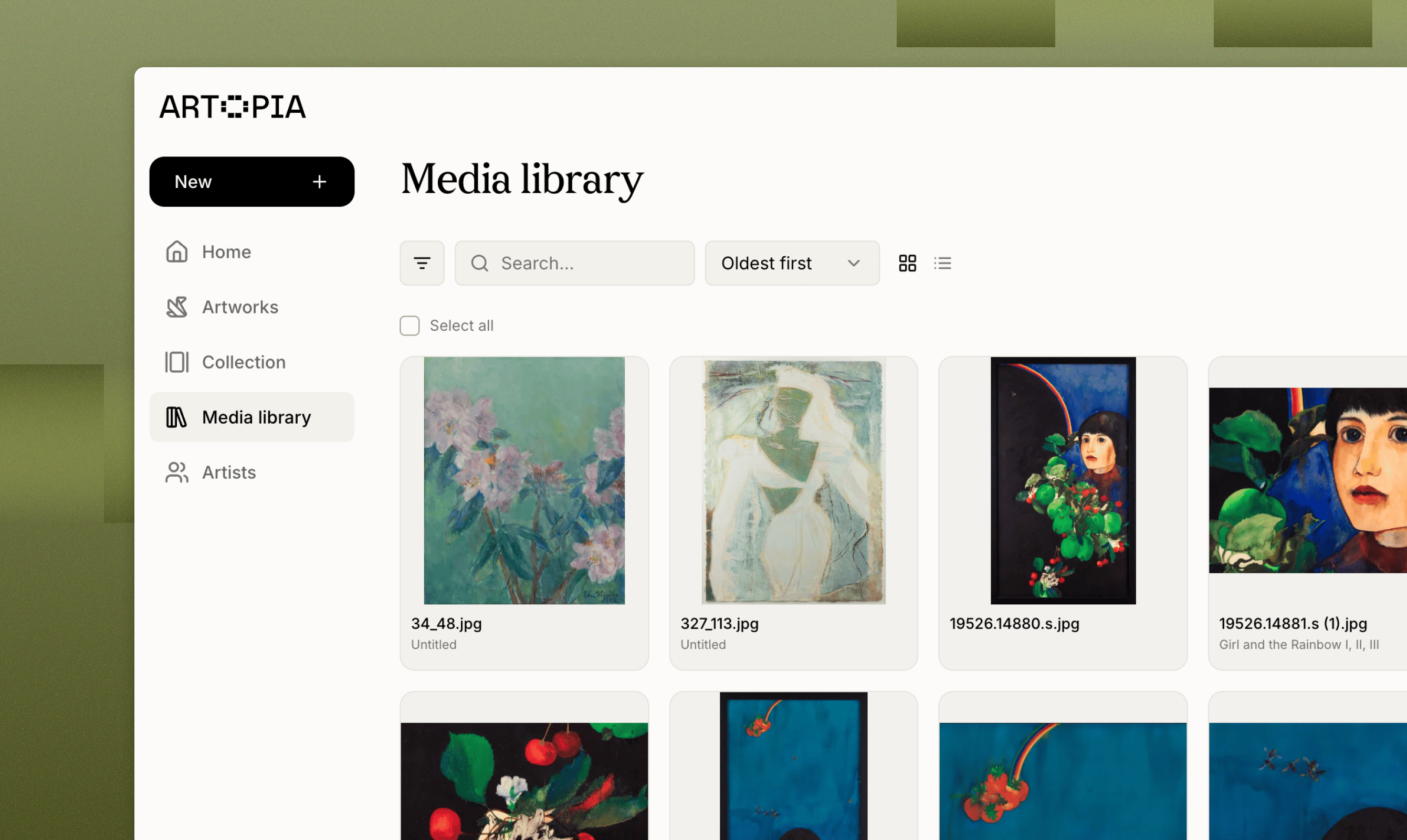
Artopia’s Media library stores every image and document you upload. Search, rename, download and link files to artwork records from one central location.
The Media library holds every image and document across your collection. Whatever you upload to Artopia, whether from an artwork record or directly here, is stored in one place.
Use the search bar to find a file by title or filename. Click any file to open its details, which show the artwork it is linked to, its dimensions, size, file type and when it was uploaded.
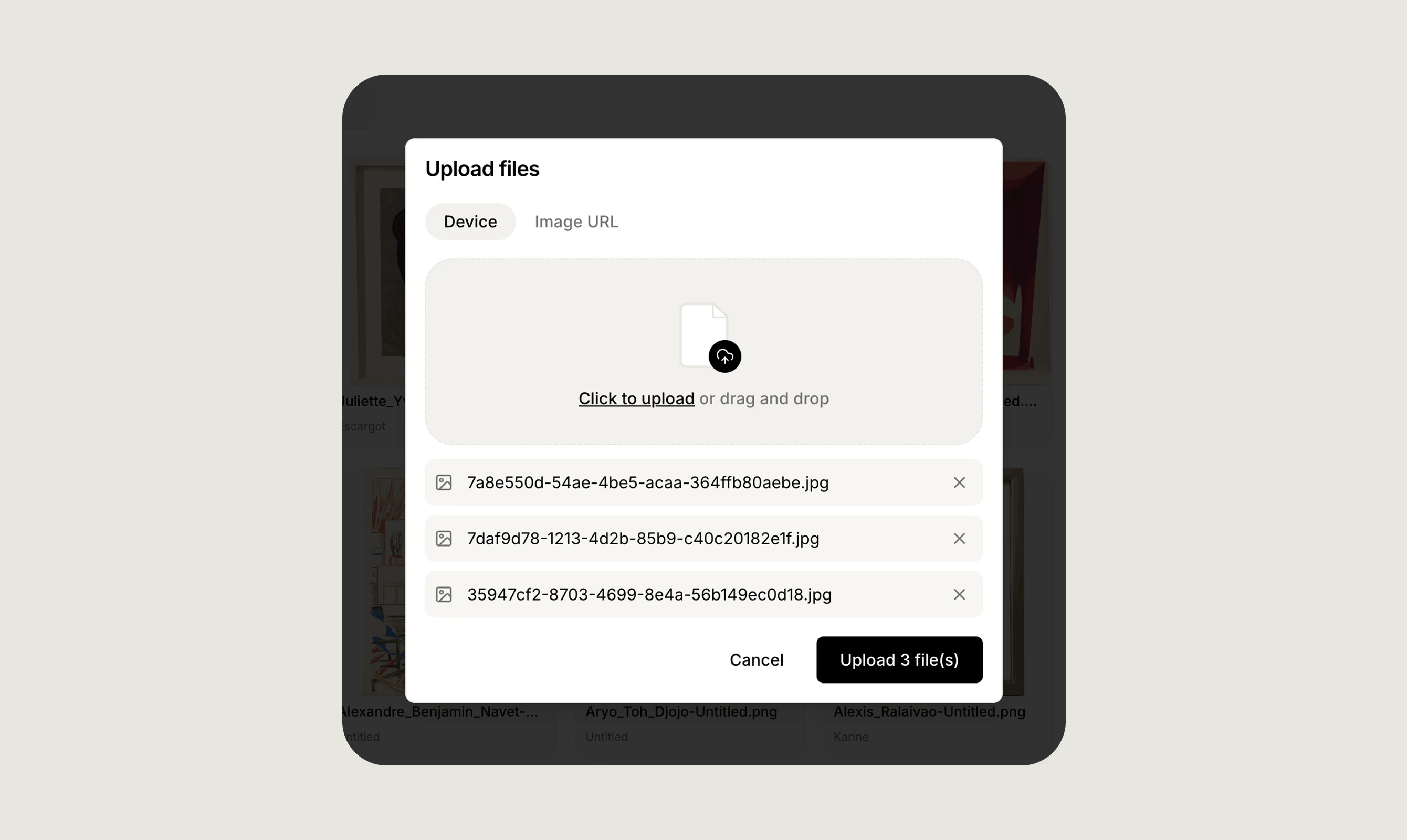
You can upload images and documents straight from the Media library, either from your device or by URL, and several at a time. Once uploaded, you can attach files to individual artwork records from the artwork’s own page.
Uploading in bulk here first is quicker than adding files one at a time from each artwork.
Every file shows which artwork it is currently linked to. To change what is attached to an artwork, whether adding or removing images and documents, go to the artwork record and edit it there.
Any file in the Media library can be downloaded from its details panel.
Was this page helpful?
{"docsConfig":{"theme":"mint","$schema":"https://mintlify.com/docs.json","name":"Artopia","description":"Artopia is the comprehensive art collection management and inventory platform designed for private collectors, art advisors, galleries, auction houses, and artists. Easily catalog your artworks with complete details, track artwork valuations over time, document provenance records, and securely attach supporting documents including certificates of authenticity and invoices. Whether managing a personal art collection or client portfolios, Artopia streamlines your art inventory management process. Share your collection publicly (optional) with collectors, institutions, and galleries, or keep it private. Key features include bulk artwork import, PDF export, and customizable public collection pages. From emerging collectors building their first collection to established collectors managing extensive inventories, Artopia is the all-in-one art collection management platform you need for complete art documentation and valuation tracking.","colors":{"primary":"#668324","light":"#ABCB62","dark":"#46571f"},"logo":{"light":"https://mintcdn.com/artopia/iD69qRxQlIIMQPDE/images/artopia-logo-black-medium.svg?fit=max\u0026auto=format\u0026n=iD69qRxQlIIMQPDE\u0026q=85\u0026s=b5cba413adee7d56dcd988c14b94b891","dark":"https://mintcdn.com/artopia/iD69qRxQlIIMQPDE/images/artopia-logo-black-medium.svg?fit=max\u0026auto=format\u0026n=iD69qRxQlIIMQPDE\u0026q=85\u0026s=b5cba413adee7d56dcd988c14b94b891","href":"https://art-opia.com/"},"favicon":{"light":"https://mintcdn.com/artopia/ByB_v1wrXQrh95Vh/images/artopia-icon-white-favicon.png?fit=max\u0026auto=format\u0026n=ByB_v1wrXQrh95Vh\u0026q=85\u0026s=5c5832cf6d18cb25c7a7298b48694d1b","dark":"https://mintcdn.com/artopia/ByB_v1wrXQrh95Vh/images/artopia-icon-white-favicon.png?fit=max\u0026auto=format\u0026n=ByB_v1wrXQrh95Vh\u0026q=85\u0026s=5c5832cf6d18cb25c7a7298b48694d1b"},"appearance":{"default":"light","strict":true},"background":{"color":{"light":"#F9F9F0","dark":"#1E1E1E"}},"navbar":{"links":[],"primary":{"type":"button","label":"Go to Artopia","href":"https://app.art-opia.com"}},"footer":{"socials":{"linkedin":"https://www.linkedin.com/company/art-opia","website":"https://art-opia.com/","instagram":"https://instagram.com/app.artopia"}},"seo":{"metatags":{"og:image":"https://framerusercontent.com/assets/cXP2PEnWynwP45Rj4k4mrc3Qa3M.png"}},"icons":{"library":"lucide"},"thumbnails":{"background":"https://mintcdn.com/artopia/1eaVaEkeGHvr4vOp/images/Websitecover.png?fit=max\u0026auto=format\u0026n=1eaVaEkeGHvr4vOp\u0026q=85\u0026s=5ba0f718e7d9a58a3e373b13ab6f78c3"},"styling":{"latex":false},"navigation":{"pages":[]}},"deployment":{"deploymentMetadataValue":{"subdomain":"artopia","hasAudioNarration":false,"actualSubdomain":"artopia","customDomains":["learn.art-opia.com"],"gitSource":{"type":"github","owner":"mintlify-community","repo":"docs-artopia-94f86543","deployBranch":"main","contentDirectory":"","isPrivate":true,"mountPath":"","label":""},"chroma":{"collectionId":"d25fdb28-db47-4eb8-98ea-d7bf733ed857","liveDeploymentHistoryId":"6abe2882a3cd31f3524a07dc","schemaVersion":"v3","latestBuiltDeploymentHistoryId":"6abe2882a3cd31f3524a07dc"},"feedback":{"thumbs":true},"entitlements":{"AI_CHAT":{"status":"DISABLED"}},"buildId":"6abe2882a3cd31f3524a07dc","clientVersion":"0.0.3990","searchFilterCounts":[{"language":"default","tag":"Features","count":30},{"language":"default","tag":"Learn","count":10},{"language":"default","tag":"Updates","count":7},{"language":"default","tag":"Product updates","count":7},{"language":"default","tag":"Help","count":6},{"language":"default","tag":"How to","count":4},{"language":"default","tag":"The basics","count":4},{"language":"default","tag":"Data","count":2},{"language":"default","tag":"Overview","count":2}]},"assistantConfig":{"enableAskAiButton":false,"enableStarterQuestions":false,"enableContextualStarterQuestions":false,"enableAskAiSearchBar":true},"basePath":"","hasChatPermissions":false,"hasWebMcpPermissions":false,"toggles":[],"isAtlas":false,"googleFontsInlined":false},"customCss":[],"page":{"pagePath":"features/media-library","slug":"/features/media-library","pageMetadata":{"title":"Media library","sidebarTitle":"Media library","description":"Artopia's Media library stores every image and document you upload. Search, rename, download and link files to artwork records from one central location.","keywords":["artwork document storage","artwork file organization","art collection inventory management"],"href":"/features/media-library"},"description":{"compiledSource":"\"use strict\";\nconst {jsx: _jsx} = arguments[0];\nconst {useMDXComponents: _provideComponents} = arguments[0];\nfunction _createMdxContent(props) {\n const _components = {\n p: \"p\",\n ..._provideComponents(),\n ...props.components\n };\n return _jsx(_components.p, {\n children: \"Artopia’s Media library stores every image and document you upload. Search, rename, download and link files to artwork records from one central location.\"\n });\n}\nfunction MDXContent(props = {}) {\n const {wrapper: MDXLayout} = {\n ..._provideComponents(),\n ...props.components\n };\n return MDXLayout ? _jsx(MDXLayout, {\n ...props,\n children: _jsx(_createMdxContent, {\n ...props\n })\n }) : _createMdxContent(props);\n}\nreturn {\n default: MDXContent\n};\n","frontmatter":{},"scope":{}},"pageType":"default","mdx":{"mdxSource":{"compiledSource":"\"use strict\";const{Fragment:_Fragment,jsx:_jsx,jsxs:_jsxs}=arguments[0];const{useMDXComponents:_provideComponents}=arguments[0];function _createMdxContent(props){const _components={a:`a`,p:`p`,..._provideComponents(),...props.components},{Frame,Heading,OptimizedImage,Tip}=_components;if(!Frame)_missingMdxReference(`Frame`,true);if(!Heading)_missingMdxReference(`Heading`,true);if(!OptimizedImage)_missingMdxReference(`OptimizedImage`,true);if(!Tip)_missingMdxReference(`Tip`,true);return _jsxs(_Fragment,{children:[_jsx(Frame,{children:_jsx(OptimizedImage,{src:`https://mintcdn.com/artopia/ODPeZVGIlqBcLkXj/images/learn-media-library-artopia.png?fit=max\u0026auto=format\u0026n=ODPeZVGIlqBcLkXj\u0026q=85\u0026s=9f8f21d1f00d04a46938816f35c600d2`,alt:`Learn Media Library Artopia`,\"data-og-width\":`2680`,width:`2680`,\"data-og-height\":`1600`,height:`1600`,\"data-path\":`images/learn-media-library-artopia.png`,\"data-optimize\":`true`,\"data-opv\":`3`,srcset:`https://mintcdn.com/artopia/ODPeZVGIlqBcLkXj/images/learn-media-library-artopia.png?w=280\u0026fit=max\u0026auto=format\u0026n=ODPeZVGIlqBcLkXj\u0026q=85\u0026s=8a7eb12738da35d22c4cdbe700fd695b 280w, https://mintcdn.com/artopia/ODPeZVGIlqBcLkXj/images/learn-media-library-artopia.png?w=560\u0026fit=max\u0026auto=format\u0026n=ODPeZVGIlqBcLkXj\u0026q=85\u0026s=536a0dcc44e5d8f181822c7c2b2b3ce4 560w, https://mintcdn.com/artopia/ODPeZVGIlqBcLkXj/images/learn-media-library-artopia.png?w=840\u0026fit=max\u0026auto=format\u0026n=ODPeZVGIlqBcLkXj\u0026q=85\u0026s=96ccb6b99838fe5c222c7578f48a78b7 840w, https://mintcdn.com/artopia/ODPeZVGIlqBcLkXj/images/learn-media-library-artopia.png?w=1100\u0026fit=max\u0026auto=format\u0026n=ODPeZVGIlqBcLkXj\u0026q=85\u0026s=4081424b1897edd2fa77fcf0a60418d4 1100w, https://mintcdn.com/artopia/ODPeZVGIlqBcLkXj/images/learn-media-library-artopia.png?w=1650\u0026fit=max\u0026auto=format\u0026n=ODPeZVGIlqBcLkXj\u0026q=85\u0026s=f4c0cce809054c17496b4a92b59fc912 1650w, https://mintcdn.com/artopia/ODPeZVGIlqBcLkXj/images/learn-media-library-artopia.png?w=2500\u0026fit=max\u0026auto=format\u0026n=ODPeZVGIlqBcLkXj\u0026q=85\u0026s=9ce603ff5b53ea0aba5f5939e366dba3 2500w`})}),`\n`,_jsxs(_components.p,{children:[`The Media library holds every image and document across your collection. Whatever you upload to Artopia, whether from an `,_jsx(_components.a,{href:`/features/adding-artworks`,children:`artwork record`}),` or directly here, is stored in one place.`]}),`\n`,_jsx(Heading,{level:`2`,id:`browsing-and-searching`,children:`Browsing and searching`}),`\n`,_jsx(_components.p,{children:`Use the search bar to find a file by title or filename. Click any file to open its details, which show the artwork it is linked to, its dimensions, size, file type and when it was uploaded.`}),`\n`,_jsx(Frame,{children:_jsx(OptimizedImage,{src:`https://mintcdn.com/artopia/uSFbmfwdJQtFB-zp/images/learn-media-library-overview-artopia-1.png?fit=max\u0026auto=format\u0026n=uSFbmfwdJQtFB-zp\u0026q=85\u0026s=219566038fdb6256b04c2b295727e5ec`,alt:`Learn Media Library Overview Artopia 1`,\"data-og-width\":`2680`,width:`2680`,\"data-og-height\":`1600`,height:`1600`,\"data-path\":`images/learn-media-library-overview-artopia-1.png`,\"data-optimize\":`true`,\"data-opv\":`3`,srcset:`https://mintcdn.com/artopia/uSFbmfwdJQtFB-zp/images/learn-media-library-overview-artopia-1.png?w=280\u0026fit=max\u0026auto=format\u0026n=uSFbmfwdJQtFB-zp\u0026q=85\u0026s=31e0e8c04fc8922195a641110fa3f70d 280w, https://mintcdn.com/artopia/uSFbmfwdJQtFB-zp/images/learn-media-library-overview-artopia-1.png?w=560\u0026fit=max\u0026auto=format\u0026n=uSFbmfwdJQtFB-zp\u0026q=85\u0026s=7f2c980ced22803dfd28cbe702d2282d 560w, https://mintcdn.com/artopia/uSFbmfwdJQtFB-zp/images/learn-media-library-overview-artopia-1.png?w=840\u0026fit=max\u0026auto=format\u0026n=uSFbmfwdJQtFB-zp\u0026q=85\u0026s=ca81768a60dc0367df9e9ab12eb9f66a 840w, https://mintcdn.com/artopia/uSFbmfwdJQtFB-zp/images/learn-media-library-overview-artopia-1.png?w=1100\u0026fit=max\u0026auto=format\u0026n=uSFbmfwdJQtFB-zp\u0026q=85\u0026s=b03ab3889a0f5cf9f46198a7824d7237 1100w, https://mintcdn.com/artopia/uSFbmfwdJQtFB-zp/images/learn-media-library-overview-artopia-1.png?w=1650\u0026fit=max\u0026auto=format\u0026n=uSFbmfwdJQtFB-zp\u0026q=85\u0026s=91f95c0817c2af8b51197a78bdbd0211 1650w, https://mintcdn.com/artopia/uSFbmfwdJQtFB-zp/images/learn-media-library-overview-artopia-1.png?w=2500\u0026fit=max\u0026auto=format\u0026n=uSFbmfwdJQtFB-zp\u0026q=85\u0026s=eae8f976462e0c1b54ad457e516c3f01 2500w`})}),`\n`,_jsx(Heading,{level:`2`,id:`uploading-files`,children:`Uploading files`}),`\n`,_jsxs(_components.p,{children:[`You can upload `,_jsx(_components.a,{href:`/learn/images`,children:`images`}),` and `,_jsx(_components.a,{href:`/learn/documents`,children:`documents`}),` straight from the Media library, either from your device or by URL, and several at a time. Once uploaded, you can attach files to individual `,_jsx(_components.a,{href:`/features/adding-artworks`,children:`artwork records`}),` from the artwork’s own page.`]}),`\n`,_jsx(Frame,{children:_jsx(OptimizedImage,{src:`https://mintcdn.com/artopia/ODPeZVGIlqBcLkXj/images/SLQLQGNYtM04iPcuqpEq4q2gEXo.avif?fit=max\u0026auto=format\u0026n=ODPeZVGIlqBcLkXj\u0026q=85\u0026s=2336bb4ed865d960338de4c8e2795882`,alt:`SLQLQGN Yt M04i Pcuqp Eq4q2g E Xo`,\"data-og-width\":`2680`,width:`2680`,\"data-og-height\":`1600`,height:`1600`,\"data-path\":`images/SLQLQGNYtM04iPcuqpEq4q2gEXo.avif`,\"data-optimize\":`true`,\"data-opv\":`3`,srcset:`https://mintcdn.com/artopia/ODPeZVGIlqBcLkXj/images/SLQLQGNYtM04iPcuqpEq4q2gEXo.avif?w=280\u0026fit=max\u0026auto=format\u0026n=ODPeZVGIlqBcLkXj\u0026q=85\u0026s=efb0f50f986b1b2364afba57a8bf0dd9 280w, https://mintcdn.com/artopia/ODPeZVGIlqBcLkXj/images/SLQLQGNYtM04iPcuqpEq4q2gEXo.avif?w=560\u0026fit=max\u0026auto=format\u0026n=ODPeZVGIlqBcLkXj\u0026q=85\u0026s=16c367adcf4ddc8eafa60f8f89c56fe8 560w, https://mintcdn.com/artopia/ODPeZVGIlqBcLkXj/images/SLQLQGNYtM04iPcuqpEq4q2gEXo.avif?w=840\u0026fit=max\u0026auto=format\u0026n=ODPeZVGIlqBcLkXj\u0026q=85\u0026s=2b90f2e8fbf249bcf7a06266856610df 840w, https://mintcdn.com/artopia/ODPeZVGIlqBcLkXj/images/SLQLQGNYtM04iPcuqpEq4q2gEXo.avif?w=1100\u0026fit=max\u0026auto=format\u0026n=ODPeZVGIlqBcLkXj\u0026q=85\u0026s=c615207993715427140d1c4d98ad88bb 1100w, https://mintcdn.com/artopia/ODPeZVGIlqBcLkXj/images/SLQLQGNYtM04iPcuqpEq4q2gEXo.avif?w=1650\u0026fit=max\u0026auto=format\u0026n=ODPeZVGIlqBcLkXj\u0026q=85\u0026s=a6b755d5aa40d7dcd729c3c81ec7d344 1650w, https://mintcdn.com/artopia/ODPeZVGIlqBcLkXj/images/SLQLQGNYtM04iPcuqpEq4q2gEXo.avif?w=2500\u0026fit=max\u0026auto=format\u0026n=ODPeZVGIlqBcLkXj\u0026q=85\u0026s=be2a1d7b3836bdce4e506d1b38a4ff72 2500w`})}),`\n`,_jsx(Tip,{children:_jsx(_components.p,{children:`Uploading in bulk here first is quicker than adding files one at a time from each artwork.`})}),`\n`,_jsx(Heading,{level:`2`,id:`renaming-files`,children:`Renaming files`}),`\n`,_jsx(_components.p,{children:`Rename any file from its details panel. Consistent, descriptive names make files easier to find as your collection grows.`}),`\n`,_jsx(Heading,{level:`2`,id:`linking-to-artworks`,children:`Linking to artworks`}),`\n`,_jsxs(_components.p,{children:[`Every file shows which artwork it is currently linked to. To change what is attached to an artwork, whether adding or removing images and documents, go to the `,_jsx(_components.a,{href:`/features/adding-artworks`,children:`artwork record`}),` and edit it there.`]}),`\n`,_jsx(Heading,{level:`2`,id:`downloading-files`,children:`Downloading files`}),`\n`,_jsx(_components.p,{children:`Any file in the Media library can be downloaded from its details panel.`})]})}function MDXContent(props={}){const{wrapper:MDXLayout}={..._provideComponents(),...props.components};return MDXLayout?_jsx(MDXLayout,{...props,children:_jsx(_createMdxContent,{...props})}):_createMdxContent(props)}return{default:MDXContent};function _missingMdxReference(id,component){throw new Error(`Expected `+(component?`component`:`object`)+\" `\"+id+\"` to be defined: you likely forgot to import, pass, or provide it.\")}","frontmatter":{},"scope":{"config":{},"pageMetadata":{"title":"Media library","sidebarTitle":"Media library","description":"Artopia's Media library stores every image and document you upload. Search, rename, download and link files to artwork records from one central location.","keywords":["artwork document storage","artwork file organization","art collection inventory management"],"href":"/features/media-library"}}},"mdxSourceWithNoJs":null},"mdxExtracts":{"tableOfContents":[{"title":"Browsing and searching","slug":"browsing-and-searching","depth":2,"children":[]},{"title":"Uploading files","slug":"uploading-files","depth":2,"children":[]},{"title":"Renaming files","slug":"renaming-files","depth":2,"children":[]},{"title":"Linking to artworks","slug":"linking-to-artworks","depth":2,"children":[]},{"title":"Downloading files","slug":"downloading-files","depth":2,"children":[]}],"codeExamples":{}},"jsLinks":[],"subdomain":"artopia","siteName":"Artopia","title":"Media library - Artopia","navMaps":{"firstHrefInVersion":{},"firstHrefInLanguage":{}},"lastModified":"2026-07-22T11:52:54.307Z","originalFileLocation":"features/media-library.mdx"},"headHtml":"\u003cscript data-mint-head>(function(){var d=document.documentElement,p=\"light\";if(!p){try{p=localStorage.getItem(\"isDarkMode\")}catch(e){}if(p==='true')p='dark';else if(p==='false')p='light';if(p!=='light'\u0026\u0026p!=='dark'\u0026\u0026p!=='system')p=\"light\"}var r=p==='system'?(matchMedia(\"(prefers-color-scheme: dark)\").matches?'dark':'light'):p;d.classList.remove(r==='dark'?'light':'dark');d.classList.add(r);d.setAttribute(\"data-theme-preference\",p)})();\u003c/script>\u003cmeta data-mint-head name=\"description\" content=\"Artopia\u0026#x27;s Media library stores every image and document you upload. Search, rename, download and link files to artwork records from one central location.\">\u003cmeta data-mint-head name=\"application-name\" content=\"Artopia\">\u003cmeta data-mint-head name=\"generator\" content=\"Mintlify\">\u003clink data-mint-head rel=\"icon\" type=\"image/png\" sizes=\"192x192\" href=\"/mintlify-assets/_mintlify/favicons/artopia/YHFqyCEdUr7tx5vO/_generated/favicon/android-chrome-192x192.png\" media=\"(prefers-color-scheme: light)\">\u003clink data-mint-head rel=\"apple-touch-icon\" type=\"image/png\" sizes=\"180x180\" href=\"/mintlify-assets/_mintlify/favicons/artopia/YHFqyCEdUr7tx5vO/_generated/favicon/apple-touch-icon.png\">\u003clink data-mint-head rel=\"icon\" type=\"image/png\" sizes=\"16x16\" href=\"/mintlify-assets/_mintlify/favicons/artopia/YHFqyCEdUr7tx5vO/_generated/favicon/favicon-16x16.png\" media=\"(prefers-color-scheme: light)\">\u003clink data-mint-head rel=\"icon\" type=\"image/png\" sizes=\"32x32\" href=\"/mintlify-assets/_mintlify/favicons/artopia/YHFqyCEdUr7tx5vO/_generated/favicon/favicon-32x32.png\" media=\"(prefers-color-scheme: light)\">\u003clink data-mint-head rel=\"shortcut icon\" type=\"image/x-icon\" href=\"/mintlify-assets/_mintlify/favicons/artopia/YHFqyCEdUr7tx5vO/_generated/favicon/favicon.ico\" media=\"(prefers-color-scheme: light)\">\u003clink data-mint-head rel=\"icon\" type=\"image/png\" sizes=\"192x192\" href=\"/mintlify-assets/_mintlify/favicons/artopia/YHFqyCEdUr7tx5vO/_generated/favicon-dark/android-chrome-192x192.png\" media=\"(prefers-color-scheme: dark)\">\u003clink data-mint-head rel=\"icon\" type=\"image/png\" sizes=\"16x16\" href=\"/mintlify-assets/_mintlify/favicons/artopia/YHFqyCEdUr7tx5vO/_generated/favicon-dark/favicon-16x16.png\" media=\"(prefers-color-scheme: dark)\">\u003clink data-mint-head rel=\"icon\" type=\"image/png\" sizes=\"32x32\" href=\"/mintlify-assets/_mintlify/favicons/artopia/YHFqyCEdUr7tx5vO/_generated/favicon-dark/favicon-32x32.png\" media=\"(prefers-color-scheme: dark)\">\u003clink data-mint-head rel=\"shortcut icon\" type=\"image/x-icon\" href=\"/mintlify-assets/_mintlify/favicons/artopia/YHFqyCEdUr7tx5vO/_generated/favicon-dark/favicon.ico\" media=\"(prefers-color-scheme: dark)\">\u003cmeta data-mint-head property=\"og:title\" content=\"Media library - Artopia\">\u003cmeta data-mint-head property=\"og:description\" content=\"Artopia\u0026#x27;s Media library stores every image and document you upload. Search, rename, download and link files to artwork records from one central location.\">\u003cmeta data-mint-head property=\"og:site_name\" content=\"Artopia\">\u003cmeta data-mint-head property=\"og:url\" content=\"https://learn.art-opia.com/features/media-library\">\u003cmeta data-mint-head property=\"og:type\" content=\"website\">\u003cmeta data-mint-head property=\"og:image\" content=\"https://framerusercontent.com/assets/cXP2PEnWynwP45Rj4k4mrc3Qa3M.png\">\u003cmeta data-mint-head property=\"og:image:width\" content=\"1200\">\u003cmeta data-mint-head property=\"og:image:height\" content=\"630\">\u003cmeta data-mint-head name=\"twitter:card\" content=\"summary_large_image\">\u003cmeta data-mint-head name=\"twitter:title\" content=\"Media library - Artopia\">\u003cmeta data-mint-head name=\"twitter:description\" content=\"Artopia\u0026#x27;s Media library stores every image and document you upload. Search, rename, download and link files to artwork records from one central location.\">\u003cmeta data-mint-head name=\"twitter:image\" content=\"https://framerusercontent.com/assets/cXP2PEnWynwP45Rj4k4mrc3Qa3M.png\">\u003cmeta data-mint-head name=\"twitter:image:width\" content=\"1200\">\u003cmeta data-mint-head name=\"twitter:image:height\" content=\"630\">\u003cmeta data-mint-head name=\"msapplication-config\" content=\"/mintlify-assets/_mintlify/favicons/artopia/YHFqyCEdUr7tx5vO/_generated/favicon/browserconfig.xml\">\u003cmeta data-mint-head name=\"apple-mobile-web-app-title\" content=\"Artopia\">\u003cmeta data-mint-head name=\"msapplication-TileColor\" content=\"#668324\">\u003clink data-mint-head rel=\"canonical\" href=\"https://learn.art-opia.com/features/media-library\">\u003clink data-mint-head rel=\"alternate\" type=\"application/xml\" href=\"/sitemap.xml\">\u003clink data-mint-head rel=\"alternate\" type=\"text/markdown\" href=\"/features/media-library.md\">\u003cscript data-mint-head type=\"application/ld+json\">{\"@context\":\"https://schema.org\",\"@graph\":[{\"@type\":\"Organization\",\"@id\":\"https://learn.art-opia.com/#organization\",\"name\":\"Artopia\",\"url\":\"https://learn.art-opia.com\",\"logo\":{\"@type\":\"ImageObject\",\"url\":\"https://mintcdn.com/artopia/iD69qRxQlIIMQPDE/images/artopia-logo-black-medium.svg?fit=max\u0026auto=format\u0026n=iD69qRxQlIIMQPDE\u0026q=85\u0026s=b5cba413adee7d56dcd988c14b94b891\"}},{\"@type\":\"WebSite\",\"@id\":\"https://learn.art-opia.com#website\",\"name\":\"Artopia\",\"url\":\"https://learn.art-opia.com\",\"publisher\":{\"@id\":\"https://learn.art-opia.com/#organization\"}},{\"@type\":\"WebPage\",\"@id\":\"https://learn.art-opia.com/features/media-library#webpage\",\"url\":\"https://learn.art-opia.com/features/media-library\",\"name\":\"Media library\",\"description\":\"Artopia's Media library stores every image and document you upload. Search, rename, download and link files to artwork records from one central location.\",\"dateModified\":\"2026-07-22T11:52:54.307Z\",\"isPartOf\":{\"@id\":\"https://learn.art-opia.com#website\"},\"breadcrumb\":{\"@id\":\"https://learn.art-opia.com/features/media-library#breadcrumb\"}},{\"@type\":\"BreadcrumbList\",\"@id\":\"https://learn.art-opia.com/features/media-library#breadcrumb\",\"itemListElement\":[{\"@type\":\"ListItem\",\"position\":1,\"name\":\"Features\",\"item\":\"https://learn.art-opia.com/features/artworks\"},{\"@type\":\"ListItem\",\"position\":2,\"name\":\"Media library\",\"item\":\"https://learn.art-opia.com/features/media-library\"}]},{\"@type\":[\"Article\",\"TechArticle\"],\"@id\":\"https://learn.art-opia.com/features/media-library#article\",\"headline\":\"Media library\",\"name\":\"Media library\",\"description\":\"Artopia's Media library stores every image and document you upload. Search, rename, download and link files to artwork records from one central location.\",\"url\":\"https://learn.art-opia.com/features/media-library\",\"mainEntityOfPage\":{\"@id\":\"https://learn.art-opia.com/features/media-library#webpage\"},\"image\":\"https://framerusercontent.com/assets/cXP2PEnWynwP45Rj4k4mrc3Qa3M.png\",\"dateModified\":\"2026-07-22T11:52:54.307Z\",\"keywords\":\"artwork document storage, artwork file organization, art collection inventory management\",\"publisher\":{\"@id\":\"https://learn.art-opia.com/#organization\"},\"isPartOf\":{\"@id\":\"https://learn.art-opia.com#website\"}}]}\u003c/script>\u003cscript data-mint-head type=\"application/ld+json\">{\"@context\":\"https://schema.org\",\"@type\":\"WebSite\",\"name\":\"Artopia\",\"creator\":{\"@type\":\"Organization\",\"name\":\"Mintlify\",\"url\":\"https://mintlify.com\"}}\u003c/script>","siteName":"Artopia","nav":{"global":null,"tabs":[{"tab":"Learn","pages":[{"title":"Learn","href":"/learn/welcome-to-artopia"}]},{"tab":"Features","groups":[{"group":"Features","pages":[{"title":"Artworks","sidebarTitle":"Artworks","href":"/features/artworks"},{"title":"Manage artists in your collection ","sidebarTitle":"Artists","href":"/features/artists"},{"title":"Series \u0026 Tags","sidebarTitle":"Series \u0026 Tags","href":"/features/series-tags"},{"title":"Artwork groups","sidebarTitle":"Artwork groups","href":"/features/artwork-groups"},{"title":"Inventory numbering","sidebarTitle":"Inventory numbering","href":"/features/inventory-numbering"},{"title":"Provenance \u0026 Condition reports ","sidebarTitle":"Provenance \u0026 Condition","href":"/features/provenance-and-condition"},{"title":"Search, filter, and sort artworks","sidebarTitle":"Search \u0026 Filter","href":"/features/filtering-artworks"},{"title":"Bulk actions","sidebarTitle":"Bulk actions","href":"/features/bulk-actions"},{"title":"Value \u0026 Insights","sidebarTitle":"Value \u0026 Insights","description":"Log acquisitions, valuations, insurance figures and sale prices for each artwork, and open the Insights panel for a live summary of purchase value, top works, documents and acquisitions.","href":"/artworks/value-insights"},{"title":"Media library","sidebarTitle":"Media library","href":"/features/media-library"},{"title":"Your public collection","sidebarTitle":"Public collection","description":"Share your Artopia collection at a custom URL. Choose which artworks appear, add press coverage, take enquiries from visitors and preview the page on desktop or mobile.","href":"/features/public-collection"},{"title":"Private viewing rooms","sidebarTitle":"Private viewing rooms","href":"/features/private-viewing-rooms"},{"title":"Transfer artworks","sidebarTitle":"Transfers","href":"/features/sharing"},{"title":"Create \u0026 Configure PDFs","sidebarTitle":"Creating PDFs","href":"/features/creating-pdfs"}]},{"group":"Data","pages":[{"title":"Import your collection to Artopia","sidebarTitle":"Importing data","href":"/features/importing-data"},{"title":"Export your data from Artopia","sidebarTitle":"Exporting data","href":"/features/exporting-data"}]}]},{"tab":"Updates","pages":[{"title":"Updates","href":"/updates/september-2026"}]},{"tab":"Help","pages":[{"title":"Help","href":"/help/faq"}]}]},"title":"Media library - Artopia","buildId":"dpl_2oYXwqkEXirXBPk8wV1FtM5USFWi","deploymentId":"dpl_2oYXwqkEXirXBPk8wV1FtM5USFWi","dynamics":["07c022d89b","a74be98ba7"],"chunks":["Frame-BbYRHtLl.js","DynamicMarkdown-DN96a4Ur.js","zoom-image-lightbox-D7yRe3On.js","lightbox-handle-r17bVUz3.js"]}